User Interface
The user interface library is build upon SKIA. This is a great library in cpp which renders geometries, images, paths, and many other geometries. Check the SKIA API to see what is possible. The main thing you need to understand is that Curan only executes the connection between the GPU and your CPU, all other things are taken care of by SKIA.
The first step in all our programming is to properly link our executable to the user interface library, we can achieve this through.
add_executable(myexecutable main.cpp)


target_link_libraries(myexecutable PUBLIC
userinterface
)
Now the compiler can link safely to our library.
- Signal: Signal
- SignalProcessor : SignalProcessor
- Empty Canvas : Empty Canvas
- Containers and Buttons : Containers and Buttons
- Render Containers with Pages : Render Containers with Pages
- ImageDisplay : ImageDisplay
- ImutableTextPanel : ImutableTextPanel
- ItemExplorer : ItemExplorer
- Loader and Overlays : Loader
- MiniPage(todo) : MiniPage
- MutatingTextPanel(todo) : MutatingTextPanel
- OpenIGTLinkViewer(todo) : OpenIGTLinkViewer
- Plotter(todo) : Plotter
- Slider(todo) : Slider
- SliderPanel(todo) : SliderPanel
- TextBlob(todo) : TextBlob
Signal
The full source code of the following tutorial is shown next. We will explain line by line what each abstraction does.
#include "userinterface/widgets/Signal.h"

void signal_tutorial() {
  using namespace curan::ui;
  using namespace curan::utilities;
  {
    Signal sig{Empty{}};
    std::visit(overloaded{[&](Empty arg) { std::printf("empty is contained inside signal\n");},
                          [&](Move arg) {},
                          [&](Press arg) {},
                          [&](Scroll arg) {},
                          [&](Unpress arg) {},
                          [&](Key arg) {},
                          [&](ItemDropped arg) {}},
               sig);
  }

  {
    Signal sig{ItemDropped{2, {"path/to/file", {"path/to/file2"}}}};
    std::visit(overloaded{[&](Empty arg) {},
                          [&](Move arg) {},
                          [&](Press arg) {},
                          [&](Scroll arg) {},
                          [&](Unpress arg) {},
                          [&](Key arg) {},
                          [&](ItemDropped arg) {std::printf("item dropped is contained inside signal\n");}},
               sig);
  }

  {
    Signal sig{Key{GLFW_KEY_E, glfwGetKeyScancode(GLFW_KEY_E), GLFW_PRESS, 0}};
    std::visit(overloaded{[&](Empty arg) {},
                          [&](Move arg) {},
                          [&](Press arg) {},
                          [&](Scroll arg) {},
                          [&](Unpress arg) {},
                          [&](Key arg) {std::printf("key pressed is contained inside signal\n");},
                          [&](ItemDropped arg) {}},
               sig);
  }

  {
    Signal sig{Move{400, 300}};
    std::visit(overloaded{[&](Empty arg) {},
                          [&](Move arg) {std::printf("move is contained inside signal\n");},
                          [&](Press arg) {},
                          [&](Scroll arg) {},
                          [&](Unpress arg) {},
                          [&](Key arg) {},
                          [&](ItemDropped arg) {}},
               sig);
  }

  {
    Signal sig{Press{400, 300}};
    std::visit(overloaded{[&](Empty arg) {},
                          [&](Move arg) {},
                          [&](Press arg) {std::printf("press is contained inside signal\n");},
                          [&](Scroll arg) {},
                          [&](Unpress arg) {},
                          [&](Key arg) {},
                          [&](ItemDropped arg) {}},
               sig);
  }

  {
    Signal sig{Scroll{400, 300, 10, 10}};
    std::visit(overloaded{[&](Empty arg) {},
                          [&](Move arg) {},
                          [&](Press arg) {},
                          [&](Scroll arg) {std::printf("scroll is contained inside signal\n");},
                          [&](Unpress arg) {},
                          [&](Key arg) {},
                          [&](ItemDropped arg) {}},
               sig);
  }

  {
    Signal sig{Unpress{400, 300}};
    std::visit(overloaded{[&](Empty arg) {},
                          [&](Move arg) {},
                          [&](Press arg) {},
                          [&](Scroll arg) {},
                          [&](Unpress arg) {std::printf("unpress is contained inside signal\n");},
                          [&](Key arg) {},
                          [&](ItemDropped arg) {}},
               sig);
  }
}
firstly we include the necessary headers
#include "userinterface/widgets/Signal.h"
the signal class basically is used internally to transcode events in the computer unto a compatible type that curan consumes. Note that we employ std::variants. In C++ one could use an hierarquy of classes that would modify their behavior depending on which signal is implemented. This requires heap allocations. Another approach is to use unions, but they are well known to be unsafe when careless use is employed. Variants are the safe version of this union. To visit the class currently contained inside a variant, we employ an std::visit that receives a lambda for each type that might be in the processed variant as so
    Signal sig{Empty{}};
    std::visit(overloaded{[&](Empty arg) {std::printf("empty is contained inside signal\n");},
                          [&](Move arg) {},
                          [&](Press arg) {},
                          [&](Scroll arg) {},
                          [&](Unpress arg) {},
                          [&](Key arg) {},
                          [&](ItemDropped arg) {}},
               sig);
note that in this case we only provide a body to the empty type inside the signal. Because we allocate the signal with the empty class then nothing else will be executed at runtime
The remaining calls will perform exactly with this logic behind them. Most signals have properties that make them understandable, e.g., a move signal has information regarding where is the current location of the mouse.
SignalProcessor
Note This mostly internal, and should only matter for people that implement widgets
The full source code of the following tutorial is shown next. We will explain line by line what each abstraction does.
#include "userinterface/widgets/SignalProcessor.h"
#include <iostream>

void signal_processor_tutorial() {
  using namespace curan::ui;
  SkRect outside_rectangle = SkRect::MakeXYWH(50, 50, 100, 100);
  SkRect inner_rectangle = SkRect::MakeXYWH(75, 75, 25, 25);
  SignalInterpreter interpreter{};

  interpreter.set_format(true);
  auto check_inner = [&](double x, double y) {
    return inner_rectangle.contains(x, y);
  };
  auto check_outer = [&](double x, double y) {
    return outside_rectangle.contains(x, y);
  };
  std::cout << interpreter;
  interpreter.process(check_outer, check_inner,
                      curan::ui::Move{1, 1});
  std::cout << interpreter;
  interpreter.process(check_outer, check_inner,
                      curan::ui::Move{54, 54});
  std::cout << interpreter;
  interpreter.process(check_outer, check_inner,
                      curan::ui::Move{54, 54});
  std::cout << interpreter;
  interpreter.process(check_outer, check_inner,
                      curan::ui::Move{77, 77});
  std::cout << interpreter;
  interpreter.process(check_outer, check_inner,
                      curan::ui::Move{77, 77});
  std::cout << interpreter;
  interpreter.process(check_outer, check_inner,
                      curan::ui::Press{77, 77});
  std::cout << interpreter;
  interpreter.process(check_outer, check_inner,
                      curan::ui::Press{77, 77});
  std::cout << interpreter;
  interpreter.process(check_outer, check_inner,
                      curan::ui::Move{77, 77});
  std::cout << interpreter;
  interpreter.process(check_outer, check_inner,
                      curan::ui::Unpress{77, 77});
  std::cout << interpreter;
  interpreter.process(check_outer, check_inner,
                      curan::ui::Unpress{77, 77});
  std::cout << interpreter;
  interpreter.process(check_outer, check_inner,
                      curan::ui::Move{54, 54});
  std::cout << interpreter;
  interpreter.process(check_outer, check_inner,
                      curan::ui::Move{1, 1});
  std::cout << interpreter;
}
firstly we include the necessary headers
#include "userinterface/widgets/SignalProcessor.h"
#include <iostream>
now let us understand what is the purpose of SignalInterpreter. Is all widgets there is an important concept related with the location of the widget. A widget only exists once placed in a location on screen. This implies that something must compute the relative location of the widget (containers, but more on that later) Because widgets might desire to control their size, there are two rectangular regions that must be considered, the allocated region where the rectangle can exist on screen, and the actual rectangular region where the widget is drawn. We define these two regions and two rectangles in the following code snippet.
 using namespace curan::ui;
  SkRect outside_rectangle = SkRect::MakeXYWH(50, 50, 100, 100);
  SkRect inner_rectangle = SkRect::MakeXYWH(75, 75, 25, 25);
  SignalInterpreter interpreter{};

  interpreter.set_format(true);
  auto check_inner = [&](double x, double y) {
    return inner_rectangle.contains(x, y);
  };
  auto check_outer = [&](double x, double y) {
    return outside_rectangle.contains(x, y);
  };
to infor the interpreter about a particular signal we call the following
  interpreter.process(check_outer, check_inner,
                      curan::ui::Move{1, 1});
note that we employ lambdas instead of requesting the rectangles themselfs because the developer might be interested in defining regions which are non rectangular. Let us focus on the interpreter itself. Note that each widget must have logic associated with its state, e.g., was it visited previously?, these sort of events are recorded unto a size_t where each bit represents a particular event. The interpreter processes the incoming signals and toggles each bit depending on whats appropriate (where the bits are associated with the the following enum)
enum InterpreterStatus : size_t
{
    MOUSE_CLICKED_LEFT_EVENT = 1 << 1,
    MOUSE_CLICKED_LEFT = 1 << 2,
    MOUSE_CLICKED_RIGHT_EVENT = 1 << 3,
    MOUSE_CLICKED_RIGHT = 1 << 4,
    MOUSE_UNCLICK_LEFT_EVENT = 1 << 5,
    MOUSE_UNCLICK_RIGHT_EVENT = 1 << 6,
    MOUSE_MOVE_EVENT = 1 << 7, // move is always an event
    SCROLL_EVENT = 1 << 8,     // scroll is always an event
    OUTSIDE_ALLOCATED_AREA = 1 << 9,
    INSIDE_ALLOCATED_AREA = 1 << 10,
    ENTERED_ALLOCATED_AREA_EVENT = 1 << 11,
    LEFT_ALLOCATED_AREA_EVENT = 1 << 12,
    OUTSIDE_FIXED_AREA = 1 << 13,
    INSIDE_FIXED_AREA = 1 << 14,
    LEFT_FIXED_AREA_EVENT = 1 << 15,
    ENTERED_FIXED_AREA_EVENT = 1 << 16,
    ITEM_DROPPED_EVENT = 1 << 17,
    KEY_EVENT = 1 << 18,
    HEART_BEAT = 1 << 19
};
to understand how it work we list a sequence of events that we might be interested in processing. The sequence of events is:
- 1) move motion located outside
- 2) a move inside the outer rectangle
- 3) a move still on top of the outer region
- 4) a move inside the inner region
- 5) a move still inside the top region
- 6) a press event is triggered
- 7) we move the mouse while pressing it
- 8) we unpress the mouse
- 9) then we move the mouse inside the outer region
- 10) lastly we move completly away both outer and inner region
What do we expected to happen inside the interpreter? Well initially the interpreter in the state of:
OUTSIDE_FIXED_AREA | OUTSIDE_ALLOCATED_AREA
that is to say nobody is interacting with the widget. Once a move event is triggered then the state changes to
OUTSIDE_FIXED_AREA | OUTSIDE_ALLOCATED_AREA | MOUSE_MOVE_EVENT
the following move enters the outside region thus the state changes to
OUTSIDE_FIXED_AREA | INSIDE_ALLOCATED_AREA | MOUSE_MOVE_EVENT | ENTERED_ALLOCATED_AREA_EVENT
note that a couple of things happen, both a one off event, ENTERED_ALLOCATED_AREA_EVENT, and we also trigger the INSIDE_ALLOCATED_AREA. Once the mouse is moved still inside the outer region then the one off event is shutdown
OUTSIDE_FIXED_AREA | INSIDE_ALLOCATED_AREA | MOUSE_MOVE_EVENT
the following event enters the inner region thus the state evolves to
INSIDE_FIXED_AREA | INSIDE_ALLOCATED_AREA | MOUSE_MOVE_EVENT | ENTERED_FIXED_AREA_EVENT
and the following logic remains. Note that to program your widget logic, if you so desire, in then a matter of querying the interpreter and react to each event as necessary.
Empty Canvas
The full source code of the following tutorial is shown next. We will explain line by line what each abstraction does.
#define STB_IMAGE_IMPLEMENTATION
#include "userinterface/Window.h"
#include <iostream>

void empty_canvas_tutorial() {
  using namespace curan::ui;
  std::unique_ptr<Context> context = std::make_unique<Context>();
  DisplayParams param{std::move(context), 1200, 800};
  std::unique_ptr<Window> viewer = std::make_unique<Window>(std::move(param));

  SkPaint paint_square;
  paint_square.setStyle(SkPaint::kFill_Style);
  paint_square.setAntiAlias(true);
  paint_square.setStrokeWidth(4);
  paint_square.setColor(SK_ColorRED);

  while (!glfwWindowShouldClose(viewer->window)) {
    auto start = std::chrono::high_resolution_clock::now();
    SkSurface *pointer_to_surface = viewer->getBackbufferSurface();
    SkCanvas *canvas = pointer_to_surface->getCanvas();
    canvas->drawColor(SK_ColorWHITE);
    SkPoint point{400, 400};
    canvas->drawCircle(point, 20.0, paint_square);
    glfwPollEvents();
    auto signals = viewer->process_pending_signals();

    bool val = viewer->swapBuffers();
    if (!val)
      std::cout << "failed to swap buffers\n";
    auto end = std::chrono::high_resolution_clock::now();
    std::this_thread::sleep_for(
        std::chrono::milliseconds(16) -
        std::chrono::duration_cast<std::chrono::milliseconds>(end - start));
  }
  return;
}
[!OUTPUT] the following shows what you would expect with the previous code listing
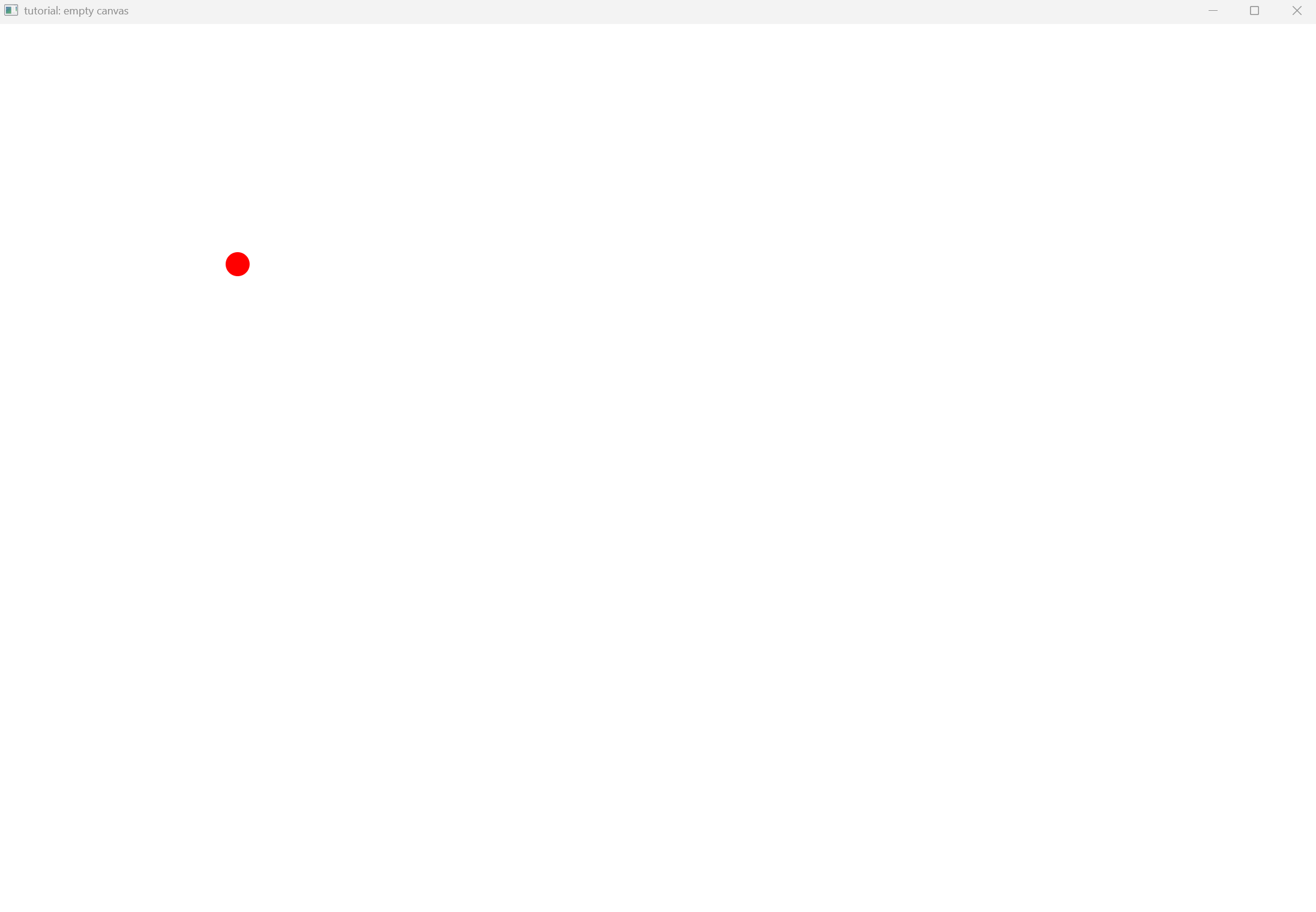
…firstly we include the necessary headers and define the macro that is used to process jpeg, png images as follows
#define STB_IMAGE_IMPLEMENTATION
#include "userinterface/Window.h"
#include <iostream>
note that we are using GPU rendering for most of our tasks. It is still up for debate if we should also deal with rendering without a GPU (SKIA makes this very easy) but for the moment, we only render with the GPU. To provide commands to the GPU most libraries require a context that stores vital information for our application. Curan is not different, we first allocate a context which is a unique_ptr. This is the case because this way we guarantee that at the end of the program we properly release the resources from the GPU
std::unique_ptr<Context> context = std::make_unique<Context>();
we then create the display parameters that will be used by the window creation logic, e.g., swapchains among other things
DisplayParams param{std::move(context), 1200, 800};
std::unique_ptr<Window> viewer = std::make_unique<Window>(std::move(param));
and we also allocate a Window inside a unique_ptr. Now note that the main loop logic is fairly simple. The while loop queries the operating system to check if events requesting window termination have been requested. So long as that is not the case, we continue running the rendering logic
while (!glfwWindowShouldClose(viewer->window)) {

  }
Inside the body of the while loop we have a following code
    auto start = std::chrono::high_resolution_clock::now();
    SkSurface *pointer_to_surface = viewer->getBackbufferSurface();
    SkCanvas *canvas = pointer_to_surface->getCanvas();
    canvas->drawColor(SK_ColorWHITE);
    SkPoint point{400, 400};
    canvas->drawCircle(point, 20.0, paint_square);
    glfwPollEvents();
    auto signals = viewer->process_pending_signals();

    bool val = viewer->swapBuffers();
    if (!val)
      std::cout << "failed to swap buffers\n";
    auto end = std::chrono::high_resolution_clock::now();
    std::this_thread::sleep_for(std::chrono::milliseconds(16) -std::chrono::duration_cast<std::chrono::milliseconds>(end - start));
Lets take a look at the lines of code that guarantee the framerate
    auto start = std::chrono::high_resolution_clock::now();
    ...
    auto end = std::chrono::high_resolution_clock::now();
    std::this_thread::sleep_for(std::chrono::milliseconds(16) -std::chrono::duration_cast<std::chrono::milliseconds>(end - start));
We record when we started rendering and loop back until the moment we stoped rendering. Once this happens, we sleep for an amount of time that is equivalent to 60 Hz. Now let us understand the remaining code. When dealing with GPUs we always have to deal with swapchains. This means that instead of telling the screen to draw each individual text or shape we create a memory region with the same size (not mandatory) as the physican screen we render into this memory regions, and then this entire blob is sent through SPI to to physical screen. To speed up the rendering pipeline, usually we create multiple regions of memory and while we are drawing into one regions, we are already sending the previous regions. This increases throughput. Thus the code queries the window for a new blob of memory unto which we can render and then we push to information unto the physical screen.
    SkSurface *pointer_to_surface = viewer->getBackbufferSurface();
    ...
    bool val = viewer->swapBuffers();
    if (!val)
      std::cout << "failed to swap buffers\n";
Each surface (memory region) has an abstraction that records drawing primitives, an SkCanvas, to which we draw into in a loop. Effectivelly what our wrapper does on top of SKIA is basically formalize coordinate computations, among other details.
    SkCanvas *canvas = pointer_to_surface->getCanvas();
    canvas->drawColor(SK_ColorWHITE);
    SkPoint point{400, 400};
    canvas->drawCircle(point, 20.0, paint_square);
Lastly we query the operating system for events and then we request a vector with all events previously recorded.
    glfwPollEvents();
    auto signals = viewer->process_pending_signals();
because the canvas is empty we do nothing with these signals. But note that when used in conjunction with widgets, the interpreters come into play and process the vectors of signals respectivelly. We prefer to be explicit while processing these details because then it becomes clear how the rendering pipeline actually works.
Containers and Buttons
Note This tutorial prints sizes of widgets and containers so that the reader can understand how things inside Curan are done. Nevertheless this code is never executed, everything is propagated internally so that the user does not have to do this work manually.
The full source code of the following tutorial is shown next. We will explain line by line what each abstraction does.
#include "userinterface/widgets/Button.h"
#include "userinterface/widgets/Container.h"

using button_ptr = std::unique_ptr<curan::ui::Button>;
using container_ptr = std::unique_ptr<curan::ui::Container>;

void create_buttons_for_demo(button_ptr &button, button_ptr &button2,
                             button_ptr &button3,
                             curan::ui::IconResources &resources) {
  using namespace curan::ui;
  button = Button::make("Touch!", resources);
  button->set_click_color(SK_ColorRED)
      .set_hover_color(SK_ColorCYAN)
      .set_waiting_color(SK_ColorGRAY)
      .set_size(SkRect::MakeWH(100, 200));

  button2 = Button::make("Touch2!", resources);
  button2->set_click_color(SK_ColorRED)
      .set_hover_color(SK_ColorCYAN)
      .set_waiting_color(SK_ColorGRAY)
      .set_size(SkRect::MakeWH(100, 200));

  button3 = Button::make("Touch3!", resources);
  button3->set_click_color(SK_ColorRED)
      .set_hover_color(SK_ColorCYAN)
      .set_waiting_color(SK_ColorGRAY)
      .set_size(SkRect::MakeWH(100, 200));
}

void create_buttons_for_demo(button_ptr &button, button_ptr &button2,
                             button_ptr &button3, button_ptr &button4,
                             curan::ui::IconResources &resources) {
  using namespace curan::ui;
  button = Button::make("Touch!", resources);
  button->set_click_color(SK_ColorRED)
      .set_hover_color(SK_ColorCYAN)
      .set_waiting_color(SK_ColorGRAY)
      .set_size(SkRect::MakeWH(100, 200));

  button2 = Button::make("Touch2!", resources);
  button2->set_click_color(SK_ColorRED)
      .set_hover_color(SK_ColorCYAN)
      .set_waiting_color(SK_ColorGRAY)
      .set_size(SkRect::MakeWH(100, 200));

  button3 = Button::make("Touch3!", resources);
  button3->set_click_color(SK_ColorRED)
      .set_hover_color(SK_ColorCYAN)
      .set_waiting_color(SK_ColorGRAY)
      .set_size(SkRect::MakeWH(100, 200));

  button4 = Button::make("Touch4!", resources);
  button4->set_click_color(SK_ColorRED)
      .set_hover_color(SK_ColorCYAN)
      .set_waiting_color(SK_ColorGRAY)
      .set_size(SkRect::MakeWH(100, 200));
}

void buttons_and_containers_tutorial() {
  using namespace curan::ui;
  IconResources resources{CURAN_COPIED_RESOURCE_PATH "/images"};
  {
    button_ptr button, button2, button3;
    create_buttons_for_demo(button, button2, button3, resources);
    container_ptr container =
        Container::make(Container::ContainerType::LINEAR_CONTAINER,
                        Container::Arrangement::HORIZONTAL);
    *container << std::move(button) << std::move(button2) << std::move(button3);
    container->set_divisions({0.0f, 0.33333f, 0.66666f, 1.0f}); // optional line
    container->compile();
    for (const auto &rec : container->get_positioning())
      std::cout << "Rect left: " << rec.fLeft << " top: " << rec.fTop
                << " right: " << rec.fRight << " bottom: " << rec.fBottom
                << "\n";
  }

  {
    button_ptr button, button2, button3;
    create_buttons_for_demo(button, button2, button3, resources);
    container_ptr container =
        Container::make(Container::ContainerType::LINEAR_CONTAINER,
                        Container::Arrangement::VERTICAL);
    *container << std::move(button) << std::move(button2) << std::move(button3);
    container->set_divisions({0.0f, 0.33333f, 0.66666f, 1.0f}); // optional line
    container->compile();
    for (const auto &rec : container->get_positioning())
      std::cout << "Rect left: " << rec.fLeft << " top: " << rec.fTop
                << " right: " << rec.fRight << " bottom: " << rec.fBottom
                << "\n";
  }

  {
    button_ptr button, button2, button3;
    create_buttons_for_demo(button, button2, button3, resources);
    container_ptr container =
        Container::make(Container::ContainerType::VARIABLE_CONTAINER,
                        Container::Arrangement::UNDEFINED);
    *container << std::move(button) << std::move(button2) << std::move(button3);
    container->set_variable_layout(
        {SkRect::MakeLTRB(0.0f, 0.0f, 0.3333f, 1.0f),
         SkRect::MakeLTRB(0.3333f, 0.0f, 0.6666f, 1.0f),
         SkRect::MakeLTRB(0.6666f, 0.0f, 1.0f, 1.0f)});
    container->compile();
    for (const auto &rec : container->get_positioning())
      std::cout << "Rect left: " << rec.fLeft << " top: " << rec.fTop
                << " right: " << rec.fRight << " bottom: " << rec.fBottom
                << "\n";
  }

  {
    button_ptr button, button2, button3;
    create_buttons_for_demo(button, button2, button3, resources);
    Button *ptr_to_button = button.get();
    Button *ptr_to_button2 = button2.get();
    Button *ptr_to_button3 = button3.get();

    container_ptr container =
        Container::make(Container::ContainerType::LINEAR_CONTAINER,
                        Container::Arrangement::HORIZONTAL);
    *container << std::move(button) << std::move(button2) << std::move(button3);
    container->set_divisions({0.0, 0.33333, 0.66666, 1.0});
    container->compile();

    SkRect my_small_window = SkRect::MakeLTRB(50, 50, 950, 950);
    container->set_position(my_small_window);
    container->framebuffer_resize(my_small_window);
    auto pos1 = ptr_to_button->get_position();
    std::cout << "Button1 left: " << pos1.fLeft << " top: " << pos1.fTop
              << " right: " << pos1.fRight << " bottom: " << pos1.fBottom
              << "\n";
    auto pos2 = ptr_to_button2->get_position();
    std::cout << "Button2 left: " << pos2.fLeft << " top: " << pos2.fTop
              << " right: " << pos2.fRight << " bottom: " << pos2.fBottom
              << "\n";
    auto pos3 = ptr_to_button3->get_position();
    std::cout << "Button3 left: " << pos3.fLeft << " top: " << pos3.fTop
              << " right: " << pos3.fRight << " bottom: " << pos3.fBottom
              << "\n";
  }
  {
    button_ptr button, button2, button3, button4;
    create_buttons_for_demo(button, button2, button3, button4, resources);
    Button *ptr_to_button = button.get();
    Button *ptr_to_button2 = button2.get();
    Button *ptr_to_button3 = button3.get();
    Button *ptr_to_button4 = button4.get();
    container_ptr container =
        Container::make(Container::ContainerType::LINEAR_CONTAINER,
                        Container::Arrangement::VERTICAL);
    *container << std::move(button) << std::move(button2) << std::move(button3);
    container->set_divisions({0.0f, 0.33333f, 0.66666f, 1.0f});

    container_ptr container2 =
        Container::make(Container::ContainerType::LINEAR_CONTAINER,
                        Container::Arrangement::HORIZONTAL);
    *container2 << std::move(container) << std::move(button4);
    container2->set_divisions({0.0f, 0.5f, 1.0f});

    SkRect my_small_window = SkRect::MakeLTRB(50, 50, 950, 950);
    container2->set_position(my_small_window);
    container2->compile();
    container2->framebuffer_resize(my_small_window);

    auto pos1 = ptr_to_button->get_position();
    std::cout << "Button1 left: " << pos1.fLeft << " top: " << pos1.fTop
              << " right: " << pos1.fRight << " bottom: " << pos1.fBottom
              << "\n";
    auto pos2 = ptr_to_button2->get_position();
    std::cout << "Button2 left: " << pos2.fLeft << " top: " << pos2.fTop
              << " right: " << pos2.fRight << " bottom: " << pos2.fBottom
              << "\n";
    auto pos3 = ptr_to_button3->get_position();
    std::cout << "Button3 left: " << pos3.fLeft << " top: " << pos3.fTop
              << " right: " << pos3.fRight << " bottom: " << pos3.fBottom
              << "\n";
    auto pos4 = ptr_to_button4->get_position();
    std::cout << "Button3 left: " << pos4.fLeft << " top: " << pos4.fTop
              << " right: " << pos4.fRight << " bottom: " << pos4.fBottom
              << "\n";
  }
}
firstly we include the necessary headers
#include "userinterface/widgets/Button.h"
#include "userinterface/widgets/Container.h"
now its time to dig in and look at the code. Although this tutorial is quite long, most of the logic is easy to grasp once you get the fundamental concepts. There are two fundamental players that we most consider, widgets and containers, i.e., there are branches (containers), that can either contain other containers or widgets, and leafs (widgets) that are the final element in each branch of a three. For this tutorial there are two utility functions that create buttons (a kind of widget).
void create_buttons_for_demo(button_ptr &button, button_ptr &button2,
                             button_ptr &button3,
                             curan::ui::IconResources &resources);

void create_buttons_for_demo(button_ptr &button, button_ptr &button2,
                             button_ptr &button3, button_ptr &button4,
                             curan::ui::IconResources &resources);
now lets look at a concrete example of how we can use containers. The IconResources is the manager of images recored in the directory used by Curan. Whenver a widget wishes to use any such image, this usually contain a IconResources reference.
 using namespace curan::ui;
  IconResources resources{CURAN_COPIED_RESOURCE_PATH "/images"};
now we create three button that we wish to place side by side where 33% of the space inside the container is reserved for each button
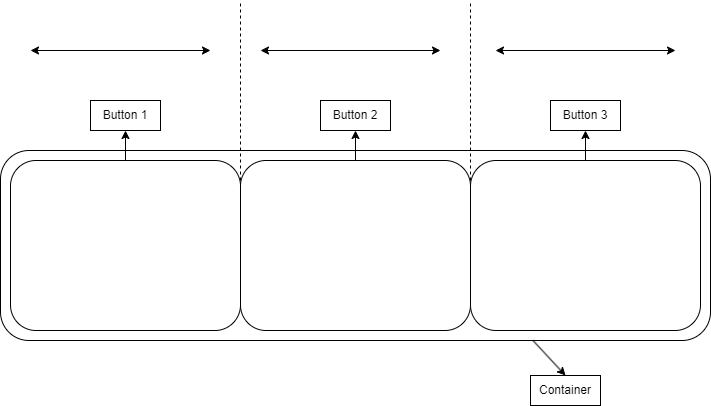
we can do so in code throught the following
  {
    button_ptr button, button2, button3;
    create_buttons_for_demo(button, button2, button3, resources);
    container_ptr container = Container::make(Container::ContainerType::LINEAR_CONTAINER,Container::Arrangement::HORIZONTAL);
    *container << std::move(button) << std::move(button2) << std::move(button3);
  }
notice that we move the widgets inside the containers. This implies that their lifetime is directly connected to the lifetime of the container. Consider that we instead wished to reserve 10% of space for the first widget, 40% for the second and 50% for the last widget. This can be achieved through
container->set_divisions({0.0f, 0.1f, 0.5f, 1.0f}); // optional line
Consider that instead of an horizontal spacing, we prefer a vertical spacing side by side
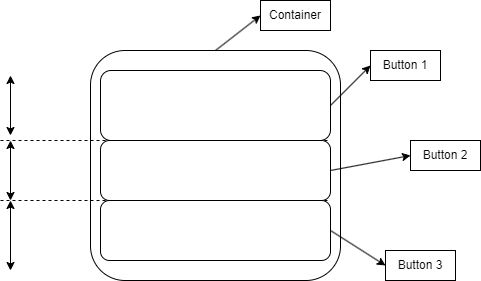
we can do so in code throught the following
  {
    button_ptr button, button2, button3;
    create_buttons_for_demo(button, button2, button3, resources);
    container_ptr container =
        Container::make(Container::ContainerType::LINEAR_CONTAINER,
                        Container::Arrangement::VERTICAL);
    *container << std::move(button) << std::move(button2) << std::move(button3);
  }
note that sometimes we require customization over exactly where we wish to place each widget.
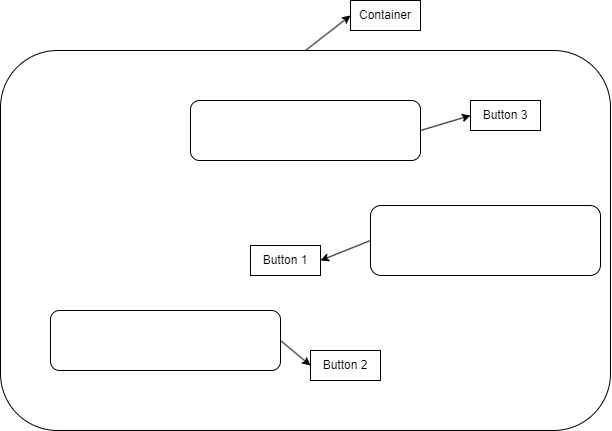
this can be achieved in code through the following snipit of code
{
    button_ptr button, button2, button3;
    create_buttons_for_demo(button, button2, button3, resources);
    container_ptr container =
        Container::make(Container::ContainerType::VARIABLE_CONTAINER,
                        Container::Arrangement::UNDEFINED);
    *container << std::move(button) << std::move(button2) << std::move(button3);
    container->set_variable_layout(
        {SkRect::MakeLTRB(0.4f, 0.0f, 0.3333f, 0.8f),
         SkRect::MakeLTRB(0.2f, 0.3333f, 0.6666f, 0.6f),
         SkRect::MakeLTRB(0.4f, 0.6666f, 1.0f, 0.8f)});
  }
Note that in previous snipits of code we queried the container for the relative sizes of each widget inside the container. Note that at some point, we need to know which is the absolute position of the widgets on screen. This is achieved by providing the container with its own position on screen and calling framebuffer_size() which propagates the relative poses of each widget inside the container. This is demonstrated in the following code snippet.
 {
    button_ptr button, button2, button3;
    create_buttons_for_demo(button, button2, button3, resources);
    Button *ptr_to_button = button.get();
    Button *ptr_to_button2 = button2.get();
    Button *ptr_to_button3 = button3.get();

    container_ptr container =
        Container::make(Container::ContainerType::LINEAR_CONTAINER,
                        Container::Arrangement::HORIZONTAL);
    *container << std::move(button) << std::move(button2) << std::move(button3);
    container->set_divisions({0.0, 0.33333, 0.66666, 1.0});
    container->compile();

    SkRect my_small_window = SkRect::MakeLTRB(50, 50, 950, 950);
    container->set_position(my_small_window);
    container->framebuffer_resize(my_small_window);
    auto pos1 = ptr_to_button->get_position();
    std::cout << "Button1 left: " << pos1.fLeft << " top: " << pos1.fTop
              << " right: " << pos1.fRight << " bottom: " << pos1.fBottom
              << "\n";
    auto pos2 = ptr_to_button2->get_position();
    std::cout << "Button2 left: " << pos2.fLeft << " top: " << pos2.fTop
              << " right: " << pos2.fRight << " bottom: " << pos2.fBottom
              << "\n";
    auto pos3 = ptr_to_button3->get_position();
    std::cout << "Button3 left: " << pos3.fLeft << " top: " << pos3.fTop
              << " right: " << pos3.fRight << " bottom: " << pos3.fBottom
              << "\n";
  }
The last imporant concept is that containers can be composed with each other. So image that you want four buttons in total. Three of these buttons should be
stacked on top of each other and ocupy 50% of the screen horizontally, while the remaining button should ocupy the remaining space, as shown in the following figure.
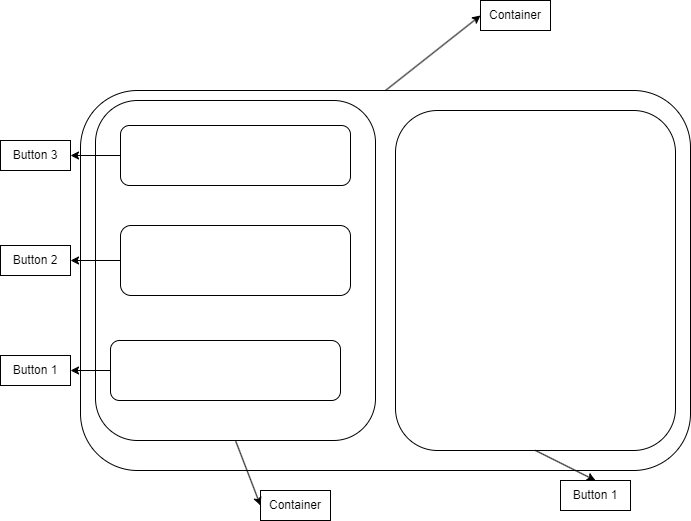
this can be achieved through the following code snippit
{
    button_ptr button, button2, button3, button4;
    create_buttons_for_demo(button, button2, button3, button4, resources);
    Button *ptr_to_button = button.get();
    Button *ptr_to_button2 = button2.get();
    Button *ptr_to_button3 = button3.get();
    Button *ptr_to_button4 = button4.get();
    container_ptr container =
        Container::make(Container::ContainerType::LINEAR_CONTAINER,
                        Container::Arrangement::VERTICAL);
    *container << std::move(button) << std::move(button2) << std::move(button3);
    container->set_divisions({0.0f, 0.33333f, 0.66666f, 1.0f});

    container_ptr container2 =
        Container::make(Container::ContainerType::LINEAR_CONTAINER,
                        Container::Arrangement::HORIZONTAL);
    *container2 << std::move(container) << std::move(button4);
    container2->set_divisions({0.0f, 0.5f, 1.0f});

    SkRect my_small_window = SkRect::MakeLTRB(50, 50, 950, 950);
    container2->set_position(my_small_window);
    container2->compile();
    container2->framebuffer_resize(my_small_window);

    auto pos1 = ptr_to_button->get_position();
    std::cout << "Button1 left: " << pos1.fLeft << " top: " << pos1.fTop
              << " right: " << pos1.fRight << " bottom: " << pos1.fBottom
              << "\n";
    auto pos2 = ptr_to_button2->get_position();
    std::cout << "Button2 left: " << pos2.fLeft << " top: " << pos2.fTop
              << " right: " << pos2.fRight << " bottom: " << pos2.fBottom
              << "\n";
    auto pos3 = ptr_to_button3->get_position();
    std::cout << "Button3 left: " << pos3.fLeft << " top: " << pos3.fTop
              << " right: " << pos3.fRight << " bottom: " << pos3.fBottom
              << "\n";
    auto pos4 = ptr_to_button4->get_position();
    std::cout << "Button3 left: " << pos4.fLeft << " top: " << pos4.fTop
              << " right: " << pos4.fRight << " bottom: " << pos4.fBottom
              << "\n";
  }
Render Containers with Pages
The full source code of the following tutorial is shown next. We will explain line by line what each abstraction does.
#define STB_IMAGE_IMPLEMENTATION
#include "userinterface/Window.h"
#include "userinterface/widgets/ConfigDraw.h"
#include "userinterface/widgets/IconResources.h"
#include "userinterface/widgets/Page.h"
#include "userinterface/widgets/Button.h"
#include "userinterface/widgets/Container.h"
#include <iostream>

void containers_and_pages(){
  using namespace curan::ui;
  IconResources resources{CURAN_COPIED_RESOURCE_PATH "/images"};
  std::unique_ptr<Context> context = std::make_unique<Context>();
  DisplayParams param{std::move(context), 600, 600};
  std::unique_ptr<Window> viewer = std::make_unique<Window>(std::move(param));
  auto button = Button::make("Touch!", resources);
  button->set_click_color(SK_ColorRED)
      .set_hover_color(SK_ColorCYAN)
      .set_waiting_color(SK_ColorGRAY)
      .set_size(SkRect::MakeWH(100, 200));

  auto button2 = Button::make("Touch2!", resources);
  button2->set_click_color(SK_ColorRED)
      .set_hover_color(SK_ColorCYAN)
      .set_waiting_color(SK_ColorGRAY)
      .set_size(SkRect::MakeWH(100, 200));

  auto button3 = Button::make("Touch3!", resources);
  button3->set_click_color(SK_ColorRED)
      .set_hover_color(SK_ColorCYAN)
      .set_waiting_color(SK_ColorGRAY)
      .set_size(SkRect::MakeWH(100, 200));

  auto container = Container::make(Container::ContainerType::LINEAR_CONTAINER,Container::Arrangement::HORIZONTAL);
  *container << std::move(button) << std::move(button2) << std::move(button3);

  curan::ui::Page page{std::move(container), SK_ColorBLACK};
  page.update_page(viewer.get());
  ConfigDraw config{&page};

  while (!glfwWindowShouldClose(viewer->window)) {
    auto start = std::chrono::high_resolution_clock::now();
    SkSurface *pointer_to_surface = viewer->getBackbufferSurface();
    SkCanvas *canvas = pointer_to_surface->getCanvas();
    if (viewer->was_updated()) {
      page.update_page(viewer.get());
      viewer->update_processed();
    }
    page.draw(canvas);
    auto signals = viewer->process_pending_signals();
    if (!signals.empty())
      page.propagate_signal(signals.back(), &config);
    glfwPollEvents();

    bool val = viewer->swapBuffers();
    if (!val)
      std::cout << "failed to swap buffers\n";
    auto end = std::chrono::high_resolution_clock::now();
    std::this_thread::sleep_for(
        std::chrono::milliseconds(16) -
        std::chrono::duration_cast<std::chrono::milliseconds>(end - start));
  }
  return;
}
firstly we include the necessary headers
#define STB_IMAGE_IMPLEMENTATION
#include "userinterface/Window.h"
#include "userinterface/widgets/ConfigDraw.h"
#include "userinterface/widgets/IconResources.h"
#include "userinterface/widgets/Page.h"
#include "userinterface/widgets/Button.h"
#include "userinterface/widgets/Container.h"
#include <iostream>
as previously, we create a context to communicate with the GPU and we create a window to render our widgets to
  using namespace curan::ui;
  IconResources resources{CURAN_COPIED_RESOURCE_PATH "/images"};
  std::unique_ptr<Context> context = std::make_unique<Context>();
  DisplayParams param{std::move(context), 600, 600};
  std::unique_ptr<Window> viewer = std::make_unique<Window>(std::move(param));
Once our window is up and running, we can create three buttons, where we parameterize their colors once click, while the mouse houvers over them and their size inside their respective container
  auto button = Button::make("Touch!", resources);
  button->set_click_color(SK_ColorRED)
      .set_hover_color(SK_ColorCYAN)
      .set_waiting_color(SK_ColorGRAY)
      .set_size(SkRect::MakeWH(100, 200));

  auto button2 = Button::make("Touch2!", resources);
  button2->set_click_color(SK_ColorRED)
      .set_hover_color(SK_ColorCYAN)
      .set_waiting_color(SK_ColorGRAY)
      .set_size(SkRect::MakeWH(100, 200));

  auto button3 = Button::make("Touch3!", resources);
  button3->set_click_color(SK_ColorRED)
      .set_hover_color(SK_ColorCYAN)
      .set_waiting_color(SK_ColorGRAY)
      .set_size(SkRect::MakeWH(100, 200));
as demonstrated in a previous tutorial, we follow up with the creation of a linear horizontal container that will allocate the 33% of horizontal space for each widget
auto container = Container::make(Container::ContainerType::LINEAR_CONTAINER,Container::Arrangement::HORIZONTAL);
  *container << std::move(button) << std::move(button2) << std::move(button3);
now comes the interesting part, for the container to be aware of the size of the window, we need a connection between the two. This is the purpose of the page, it propagates changes in size of the viewer and controls the lifetime of each widget on screen. Once the page destructor is deleted, so are all the widgets contained inside it.
  curan::ui::Page page{std::move(container), SK_ColorBLACK};
  page.update_page(viewer.get());
  ConfigDraw config{&page};
inside the rendering loop of the page we first check if the window changed sizes, if it did then we propagate this change throughout the widgets contained inside it.
...
    if (viewer->was_updated()) {
      page.update_page(viewer.get());
      viewer->update_processed();
    }
...
once this change in size is propagated we draw the page unto the canvas and process the signals inside it. Notice that the process_pending_signals() function call returns a vector with all the signals that were not processed so far (deleting them from the queue of signals to process). In this particular tutorial we choose to only propagate the last signal (thus the back call)
...
    page.draw(canvas);
    auto signals = viewer->process_pending_signals();
    if (!signals.empty())
      page.propagate_signal(signals.back(), &config);
although we could choose to propagate all the signals received so far as so
...
    page.draw(canvas);
    auto signals = viewer->process_pending_signals();
    for(auto sig : signals)
      page.propagate_signal(sig, &config);
ImageDisplay
The full source code of the following tutorial is shown next. We will explain line by line what each abstraction does.
#define STB_IMAGE_IMPLEMENTATION
#include "userinterface/Window.h"
#include "userinterface/widgets/ConfigDraw.h"
#include "userinterface/widgets/IconResources.h"
#include "userinterface/widgets/ImageDisplay.h"
#include "userinterface/widgets/Page.h"
#include "utils/TheadPool.h"
#include <iostream>

void update_image_display(curan::ui::ImageDisplay *image_display,
                          size_t image_width, size_t image_height) {
  using namespace curan::ui;
  using namespace curan::utilities;

  auto raw_data =
      std::make_shared<std::vector<uint8_t>>(image_width * image_height, 0);
  for (auto &dat : *raw_data.get())
    dat = rand();
  image_display->update_image(ImageWrapper{
      CaptureBuffer::make_shared(raw_data->data(),
                                 raw_data->size() * sizeof(uint8_t), raw_data),
      image_width, image_height});
}

void image_display_tutorial() {
  using namespace curan::ui;
  using namespace curan::utilities;
  std::unique_ptr<Context> context = std::make_unique<Context>();

  DisplayParams param{std::move(context), 600, 600};
  std::unique_ptr<Window> viewer = std::make_unique<Window>(std::move(param));
  std::unique_ptr<ImageDisplay> image_display = ImageDisplay::make();
  ImageDisplay *pointer_to = image_display.get();
  auto container = Container::make(Container::ContainerType::LINEAR_CONTAINER,
                                   Container::Arrangement::HORIZONTAL);
  *container << std::move(image_display);
  curan::ui::Page page{std::move(container), SK_ColorBLACK};
  page.update_page(viewer.get());

  std::atomic<bool> running = true;

  auto pool = ThreadPool::create(1);
  pool->submit("image display updater", [&]() {
    size_t image_width = 50;
    size_t image_height = 50;
    double timer = 0.0;
    while (running) {
      update_image_display(pointer_to, image_width + 20 * std::sin(timer),
                           image_height + 20 * std::cos(timer));
      std::this_thread::sleep_for(std::chrono::milliseconds(20));
      timer += std::chrono::milliseconds(20).count() * 1e-3;
    }
  });

  ConfigDraw config{&page};

  while (!glfwWindowShouldClose(viewer->window)) {
    auto start = std::chrono::high_resolution_clock::now();
    SkSurface *pointer_to_surface = viewer->getBackbufferSurface();
    SkCanvas *canvas = pointer_to_surface->getCanvas();
    if (viewer->was_updated()) {
      page.update_page(viewer.get());
      viewer->update_processed();
    }
    page.draw(canvas);
    auto signals = viewer->process_pending_signals();
    if (!signals.empty())
      page.propagate_signal(signals.back(), &config);
    glfwPollEvents();

    bool val = viewer->swapBuffers();
    if (!val)
      std::cout << "failed to swap buffers\n";
    auto end = std::chrono::high_resolution_clock::now();
    std::this_thread::sleep_for(
        std::chrono::milliseconds(16) -
        std::chrono::duration_cast<std::chrono::milliseconds>(end - start));
  }
  running = false;
  return;
}
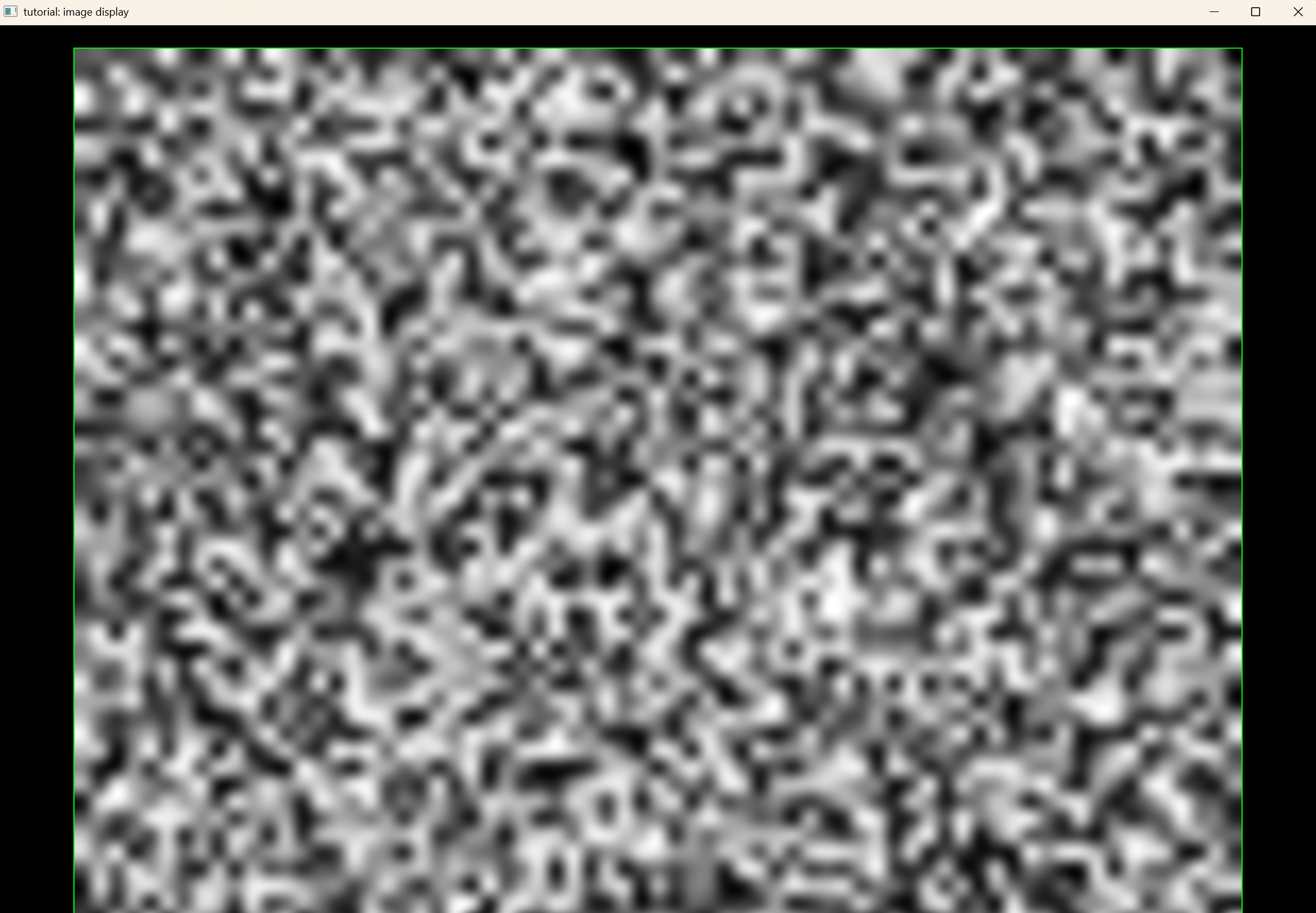
[!OUTPUT] the following shows what you would expect with the previous code listing
firstly we include the necessary headers
#define STB_IMAGE_IMPLEMENTATION
#include "userinterface/Window.h"
#include "userinterface/widgets/ConfigDraw.h"
#include "userinterface/widgets/IconResources.h"
#include "userinterface/widgets/ImageDisplay.h"
#include "userinterface/widgets/Page.h"
#include "utils/TheadPool.h"
#include <iostream>
next we define a function that takes a raw pointer to an image display, a width and height and generates a random image which is then added to the screen.
void update_image_display(curan::ui::ImageDisplay *image_display,
                          size_t image_width, size_t image_height);
Internally we allocate a piece of memory, fill it with random data, create a capture buffer that takes ownership of this data and then we create an image wrapper. An image wrapper basically passes along information regarding pixel size, dimensions, etc, of the owned piece of memory. We then update the image_display with this data.
  using namespace curan::ui;
  using namespace curan::utilities;

  auto raw_data =
      std::make_shared<std::vector<uint8_t>>(image_width * image_height, 0);
  for (auto &dat : *raw_data.get())
    dat = rand();
  image_display->update_image(ImageWrapper{
      CaptureBuffer::make_shared(raw_data->data(),
                                 raw_data->size() * sizeof(uint8_t), raw_data),
      image_width, image_height});
now back to the UI portion of this tutorial. Firstly we create a context and a window as in previous tutorials
using namespace curan::ui;
using namespace curan::utilities;
std::unique_ptr<Context> context = std::make_unique<Context>();

DisplayParams param{std::move(context), 600, 600};
std::unique_ptr<Window> viewer = std::make_unique<Window>(std::move(param));
with the window and context created we create a container and its corresponding page
std::unique_ptr<ImageDisplay> image_display = ImageDisplay::make();
ImageDisplay *pointer_to = image_display.get();
auto container = Container::make(Container::ContainerType::LINEAR_CONTAINER,
                                   Container::Arrangement::HORIZONTAL);
*container << std::move(image_display);
  curan::ui::Page page{std::move(container), SK_ColorBLACK};
  page.update_page(viewer.get());
next we submit a job to a thread pool that constantly updates the image that we wish to render unto the ImageDisplay. The thread runs for as long as the boolean flag running evaluates to true
std::atomic<bool> running = true;

auto pool = ThreadPool::create(1);
pool->submit("image display updater", [&]() {
    size_t image_width = 50;
    size_t image_height = 50;
    double timer = 0.0;
    while (running) {
      update_image_display(pointer_to, image_width + 20 * std::sin(timer),
                           image_height + 20 * std::cos(timer));
      std::this_thread::sleep_for(std::chrono::milliseconds(20));
      timer += std::chrono::milliseconds(20).count() * 1e-3;
  }
});
once the program terminates we set the running flag to false and wait for the thread pool to join all threads that are currently running
...
running = false;
ImutableTextPanel
The full source code of the following tutorial is shown next. We will explain line by line what each abstraction does.
#define STB_IMAGE_IMPLEMENTATION
#include "userinterface/Window.h"
#include "userinterface/widgets/ConfigDraw.h"
#include "userinterface/widgets/Container.h"
#include "userinterface/widgets/IconResources.h"
#include "userinterface/widgets/ImutableTextPanel.h"
#include "userinterface/widgets/Page.h"
#include "utils/TheadPool.h"
#include <iostream>

void imutable_text_panel_tutorial() {
  using namespace curan::ui;
  IconResources resources{CURAN_COPIED_RESOURCE_PATH "/images"};
  std::unique_ptr<Context> context = std::make_unique<Context>();

  DisplayParams param{std::move(context), 1200, 800};
  std::unique_ptr<Window> viewer = std::make_unique<Window>(std::move(param));

  std::unique_ptr<ImutableTextPanel> layer =
      ImutableTextPanel::make("write for life");
  layer->set_background_color({1.f, 1.0f, 1.0f, 1.0f})
      .set_text_color({.0f, .0f, .0f, 1.0f});
  auto container = Container::make(Container::ContainerType::LINEAR_CONTAINER,
                                   Container::Arrangement::VERTICAL);
  layer->setFont(ImutableTextPanel::typeface::sans_serif);
  *container << std::move(layer);

  curan::ui::Page page{std::move(container), SK_ColorBLACK};

  ConfigDraw config{&page};

  while (!glfwWindowShouldClose(viewer->window)) {
    auto start = std::chrono::high_resolution_clock::now();
    SkSurface *pointer_to_surface = viewer->getBackbufferSurface();
    SkCanvas *canvas = pointer_to_surface->getCanvas();

    if (viewer->was_updated()) {
      page.update_page(viewer.get());
      viewer->update_processed();
    }
    page.draw(canvas);
    auto signals = viewer->process_pending_signals();
    if (!signals.empty())
      page.propagate_signal(signals.back(), &config);
    glfwPollEvents();

    bool val = viewer->swapBuffers();
    if (!val)
      std::cout << "failed to swap buffers\n";
    auto end = std::chrono::high_resolution_clock::now();
    std::this_thread::sleep_for(
        std::chrono::milliseconds(16) -
        std::chrono::duration_cast<std::chrono::milliseconds>(end - start));
  }
}
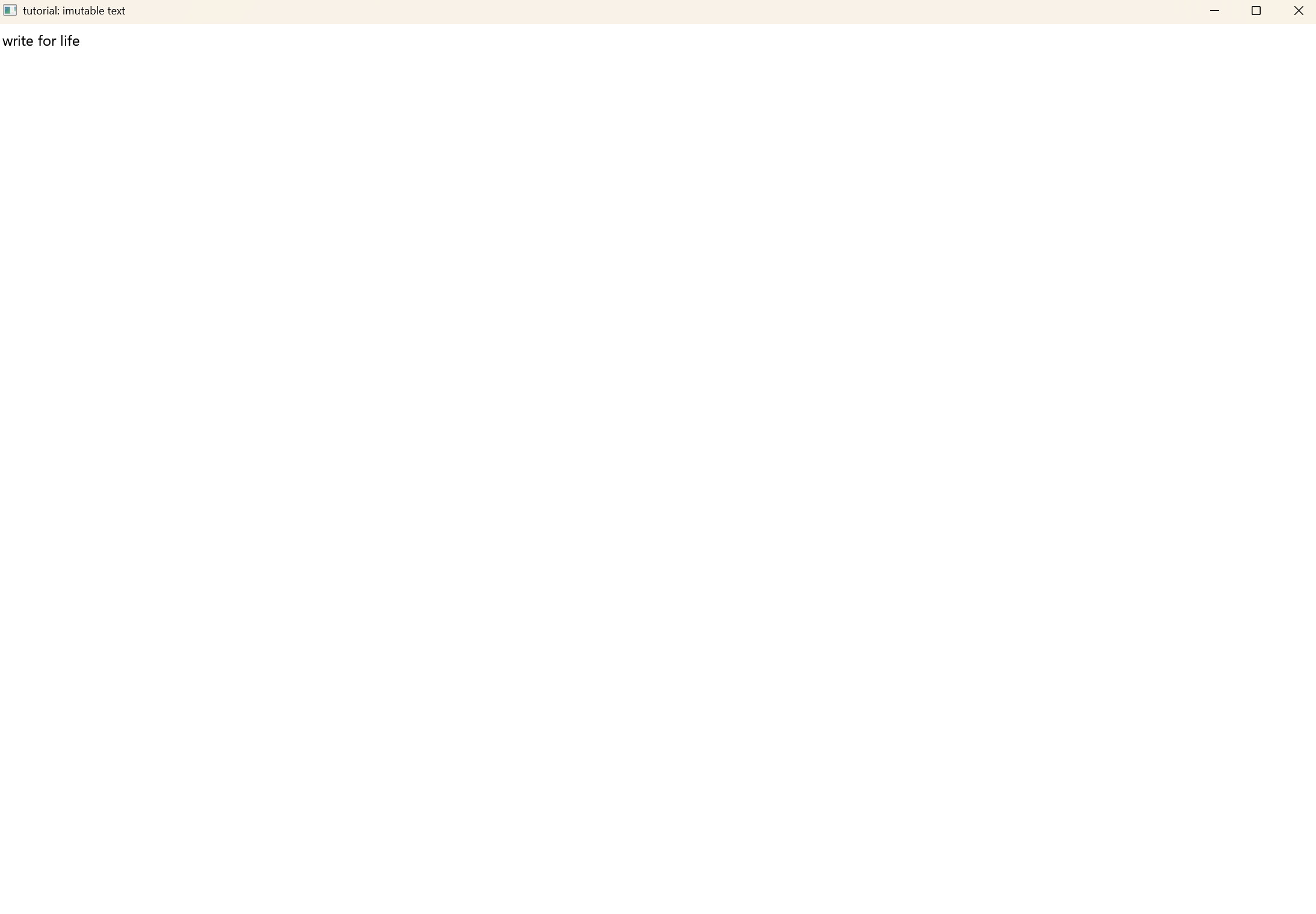
[!OUTPUT] the following shows what you would expect with the previous code listing
firstly we include the necessary headers
#define STB_IMAGE_IMPLEMENTATION
#include "userinterface/Window.h"
#include "userinterface/widgets/ConfigDraw.h"
#include "userinterface/widgets/Container.h"
#include "userinterface/widgets/IconResources.h"
#include "userinterface/widgets/ImutableTextPanel.h"
#include "userinterface/widgets/Page.h"
#include "utils/TheadPool.h"
#include <iostream>
Now we create the ImutableTextPanel with a default text. Note that imutable actually does not mean that it can’t change, it just means that it can’t be edited by the user whilst the program runs, but through our code, we can modify it at will. As with previous tutorials, as soon as we create the necessary page the text will be rendered on screen.
std::unique_ptr<ImutableTextPanel> layer = ImutableTextPanel::make("write for life");
  layer->set_background_color({1.f, 1.0f, 1.0f, 1.0f})
      .set_text_color({.0f, .0f, .0f, 1.0f});
  auto container = Container::make(Container::ContainerType::LINEAR_CONTAINER, Container::Arrangement::VERTICAL);
  layer->setFont(ImutableTextPanel::typeface::sans_serif);
  *container << std::move(layer);

  curan::ui::Page page{std::move(container), SK_ColorBLACK};
ItemExplorer
The full source code of the following tutorial is shown next. We will explain line by line what each abstraction does.
#define STB_IMAGE_IMPLEMENTATION
#include "userinterface/Window.h"
#include "userinterface/widgets/ConfigDraw.h"
#include "userinterface/widgets/Container.h"
#include "userinterface/widgets/IconResources.h"
#include "userinterface/widgets/ItemExplorer.h"
#include "userinterface/widgets/Page.h"
#include <iostream>

void item_explorer_tutorial() {
  using namespace curan::ui;
  using namespace curan::utilities;
  IconResources resources{CURAN_COPIED_RESOURCE_PATH "/images"};
  std::unique_ptr<Context> context = std::make_unique<Context>();

  DisplayParams param{std::move(context), 1200, 800};
  std::unique_ptr<Window> viewer = std::make_unique<Window>(std::move(param));

  std::shared_ptr<std::array<unsigned char, 100 * 100>> image_buffer =
      std::make_shared<std::array<unsigned char, 100 * 100>>();
  constexpr float maximum_size = 2 * 50.0 * 50.0;
  for (size_t row = 0; row < 100; ++row)
    for (size_t col = 0; col < 100; ++col)
      (*image_buffer)[row + col * 100] = static_cast<unsigned char>(
          (((row - 50.0) * (row - 50.0) + (col - 50.0) * (col - 50.0)) /
           maximum_size) *
          255.0);

  auto buff = CaptureBuffer::make_shared(
      image_buffer->data(), image_buffer->size() * sizeof(unsigned char),
      image_buffer);

  std::map<int, std::string> items_to_add;
  items_to_add.emplace(0, "zero");
  items_to_add.emplace(1, "one");
  items_to_add.emplace(2, "two");
  items_to_add.emplace(3, "three");
  items_to_add.emplace(4, "four");
  items_to_add.emplace(5, "five");
  items_to_add.emplace(6, "six");
  items_to_add.emplace(7, "seven");
  items_to_add.emplace(8, "eight");
  items_to_add.emplace(9, "nine");
  items_to_add.emplace(10, "ten");
  items_to_add.emplace(11, "eleven");
  items_to_add.emplace(12, "twelve");
  items_to_add.emplace(13, "thirteen");

  auto item_explorer = ItemExplorer::make("file_icon.png", resources);
  auto ptr_item_explorer = item_explorer.get();

  std::atomic<bool> running = true;

  auto pool = ThreadPool::create(1);
  pool->submit("data injector and remover", [&]() {
    for (size_t i = 0; i < 14; ++i) {
      ptr_item_explorer->add(Item{i, items_to_add.at(i), buff, 100, 100});
      std::this_thread::sleep_for(std::chrono::milliseconds(1000));
    }

    for (size_t i = 0; i < 14; ++i) {
      ptr_item_explorer->remove(i);
      std::this_thread::sleep_for(std::chrono::milliseconds(1000));
    }
  });

  auto container = Container::make(Container::ContainerType::LINEAR_CONTAINER,
                                   Container::Arrangement::VERTICAL);
  *container << std::move(item_explorer);

  curan::ui::Page page{std::move(container), SK_ColorBLACK};

  ConfigDraw config{&page};

  while (!glfwWindowShouldClose(viewer->window)) {
    auto start = std::chrono::high_resolution_clock::now();
    SkSurface *pointer_to_surface = viewer->getBackbufferSurface();
    SkCanvas *canvas = pointer_to_surface->getCanvas();
    if (viewer->was_updated()) {
      page.update_page(viewer.get());
      viewer->update_processed();
    }
    page.draw(canvas);
    auto signals = viewer->process_pending_signals();
    if (!signals.empty())
      page.propagate_signal(signals.back(), &config);
    glfwPollEvents();

    bool val = viewer->swapBuffers();
    if (!val)
      std::cout << "failed to swap buffers\n";
    auto end = std::chrono::high_resolution_clock::now();
    std::this_thread::sleep_for(
        std::chrono::milliseconds(16) -
        std::chrono::duration_cast<std::chrono::milliseconds>(end - start));
  }
  running = false;
  return;
}
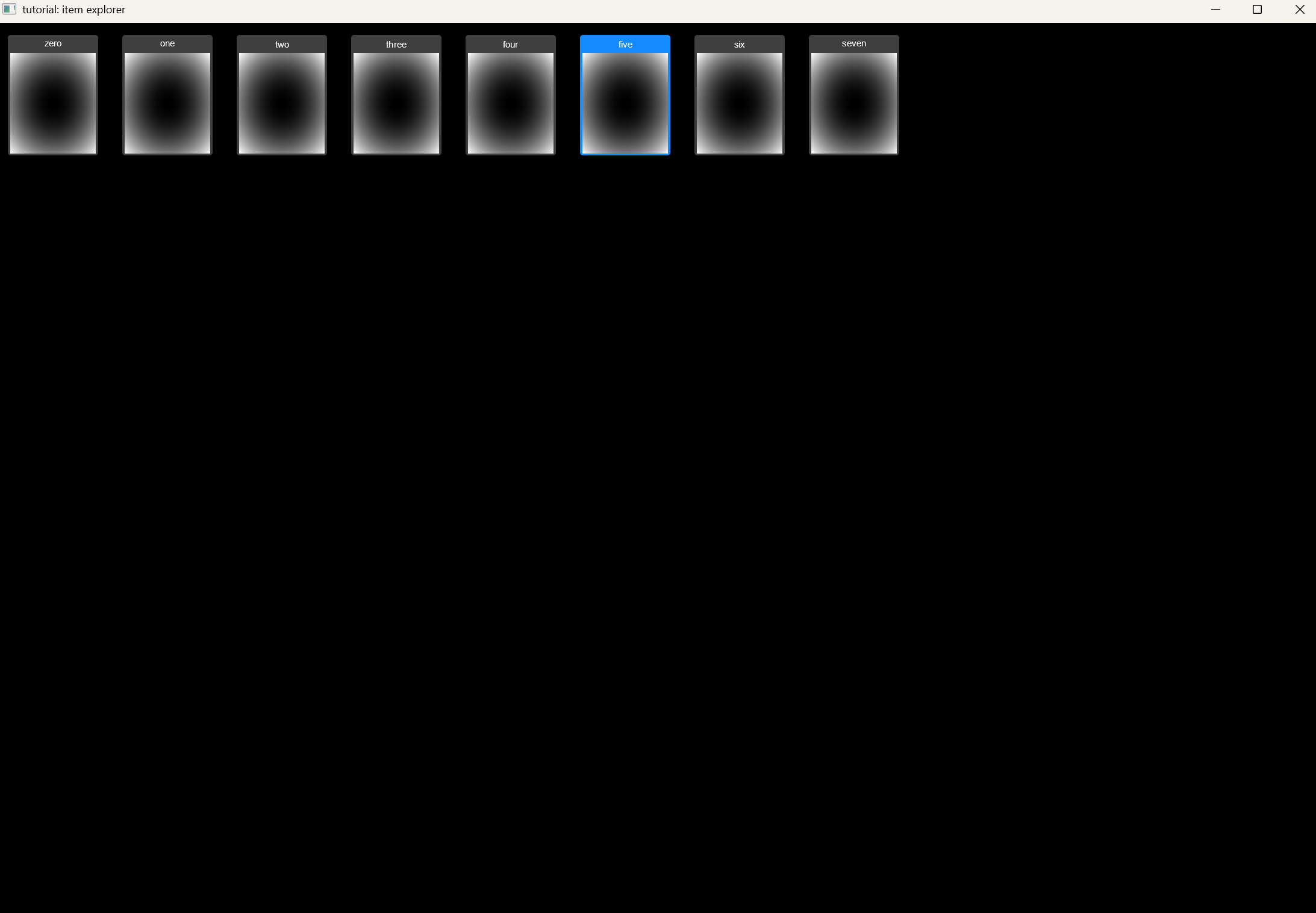
[!OUTPUT] the following shows what you would expect with the previous code listing
firstly we include the necessary headers
#define STB_IMAGE_IMPLEMENTATION
#include "userinterface/Window.h"
#include "userinterface/widgets/ConfigDraw.h"
#include "userinterface/widgets/Container.h"
#include "userinterface/widgets/IconResources.h"
#include "userinterface/widgets/ItemExplorer.h"
#include "userinterface/widgets/Page.h"
#include <iostream>
then we create the icon image that we wish to associated with each item in the ItemExplorer. This is important for the user experience, e.g., to qucikly identify which item is which, although a text representation is also supplied to the box.
std::shared_ptr<std::array<unsigned char, 100 * 100>> image_buffer =
      std::make_shared<std::array<unsigned char, 100 * 100>>();
  constexpr float maximum_size = 2 * 50.0 * 50.0;
  for (size_t row = 0; row < 100; ++row)
    for (size_t col = 0; col < 100; ++col)
      (*image_buffer)[row + col * 100] = static_cast<unsigned char>(
          (((row - 50.0) * (row - 50.0) + (col - 50.0) * (col - 50.0)) /
           maximum_size) *
          255.0);

  auto buff = CaptureBuffer::make_shared(
      image_buffer->data(), image_buffer->size() * sizeof(unsigned char),
      image_buffer);
now we allocate unto a map the names of the items we wish to push unto the ItemExplorer, (internally the ItemExplorer always appends an identifier to each item, so that we can choose which item to delete at a later point in time)
std::map<int, std::string> items_to_add;
  items_to_add.emplace(0, "zero");
  items_to_add.emplace(1, "one");
  items_to_add.emplace(2, "two");
  items_to_add.emplace(3, "three");
  items_to_add.emplace(4, "four");
  items_to_add.emplace(5, "five");
  items_to_add.emplace(6, "six");
  items_to_add.emplace(7, "seven");
  items_to_add.emplace(8, "eight");
  items_to_add.emplace(9, "nine");
  items_to_add.emplace(10, "ten");
  items_to_add.emplace(11, "eleven");
  items_to_add.emplace(12, "twelve");
  items_to_add.emplace(13, "thirteen");
with the proper arrangements done we create the item explorer and store a pointer to it (at this point you should ask yourself why is this necessary? because the unique_ptr is stored inside the contanier, thus once moved it becomes empty, thus we instead obtain the raw pointer that is inside the unique pointer which is valid even when the unique pointer is moved) because we want to demonstrate the item explorer moving and changing, we then launch a thread pool where we asyncronously add and remove elements to it.
auto item_explorer = ItemExplorer::make("file_icon.png", resources);
auto ptr_item_explorer = item_explorer.get();

std::atomic<bool> running = true;

auto pool = ThreadPool::create(1);
pool->submit("data injector and remover", [&]() {
    for (size_t i = 0; i < 14; ++i) {
      ptr_item_explorer->add(Item{i, items_to_add.at(i), buff, 100, 100});
      std::this_thread::sleep_for(std::chrono::milliseconds(1000));
    }

    for (size_t i = 0; i < 14; ++i) {
      ptr_item_explorer->remove(i);
      std::this_thread::sleep_for(std::chrono::milliseconds(1000));
    }
});
with the thread pool lauched we then allocate the container and create its page
  auto container = Container::make(Container::ContainerType::LINEAR_CONTAINER,
                                   Container::Arrangement::VERTICAL);
  *container << std::move(item_explorer);

  curan::ui::Page page{std::move(container), SK_ColorBLACK};
Loader and Overlays
The full source code of the following tutorial is shown next. We will explain line by line what each abstraction does.
#define STB_IMAGE_IMPLEMENTATION
#include "userinterface/Window.h"
#include "userinterface/widgets/Button.h"
#include "userinterface/widgets/ConfigDraw.h"
#include "userinterface/widgets/Container.h"
#include "userinterface/widgets/IconResources.h"
#include "userinterface/widgets/Loader.h"
#include "userinterface/widgets/Overlay.h"
#include "userinterface/widgets/Page.h"
#include "utils/Logger.h"
#include <iostream>

std::unique_ptr<curan::ui::Overlay> warning_overlay(const std::string &warning,curan::ui::IconResources &resources) {
  using namespace curan::ui;
  auto warn = Button::make(" ", "warning.png", resources);
  warn->set_click_color(SK_AlphaTRANSPARENT)
      .set_hover_color(SK_AlphaTRANSPARENT)
      .set_waiting_color(SK_AlphaTRANSPARENT)
      .set_size(SkRect::MakeWH(400, 200));

  auto button = Button::make(warning, resources);
  button->set_click_color(SK_AlphaTRANSPARENT)
      .set_hover_color(SK_AlphaTRANSPARENT)
      .set_waiting_color(SK_AlphaTRANSPARENT)
      .set_size(SkRect::MakeWH(200, 50));

  auto viwers_container = Container::make(Container::ContainerType::LINEAR_CONTAINER,Container::Arrangement::VERTICAL);
  *viwers_container << std::move(warn) << std::move(button);
  viwers_container->set_color(SK_ColorTRANSPARENT)
      .set_divisions({0.0, .8, 1.0});

  return Overlay::make(std::move(viwers_container),
                       SkColorSetARGB(10, 125, 125, 125), true);
}

void loader_tutorial() {
  using namespace curan::ui;
  IconResources resources{CURAN_COPIED_RESOURCE_PATH "/images"};
  std::unique_ptr<Context> context = std::make_unique<Context>();

  DisplayParams param{std::move(context), 2200, 1800};
  std::unique_ptr<Window> viewer = std::make_unique<Window>(std::move(param));

  auto button1 = Button::make("Temporal Calibration", resources);
  button1->set_click_color(SK_ColorDKGRAY)
      .set_hover_color(SK_ColorLTGRAY)
      .set_waiting_color(SK_ColorGRAY)
      .set_size(SkRect::MakeWH(300, 300));
  button1->add_press_call([&](Button *inbut, Press pres, ConfigDraw *config) {
    if (config)
      config->stack_page->stack(
          warning_overlay("Started Temporal Calibration", resources));
  });

  auto button2 = Button::make("Spatial Calibration", resources);
  button2->set_click_color(SK_ColorDKGRAY)
      .set_hover_color(SK_ColorLTGRAY)
      .set_waiting_color(SK_ColorGRAY)
      .set_size(SkRect::MakeWH(300, 300));
  button2->add_press_call([&](Button *inbut, Press pres, ConfigDraw *config) {
    if (config)
      config->stack_page->stack(
          warning_overlay("Started Spatial Calibration", resources));
  });

  auto button3 = Button::make("Volume ROI", resources);
  button3->set_click_color(SK_ColorDKGRAY)
      .set_hover_color(SK_ColorLTGRAY)
      .set_waiting_color(SK_ColorGRAY)
      .set_size(SkRect::MakeWH(300, 300));
  button3->add_press_call([&](Button *inbut, Press pres, ConfigDraw *config) {
    if (config)
      config->stack_page->stack(
          warning_overlay("Started desired Volume Specification", resources));
  });

  auto button4 = Button::make("Reconstruction", resources);
  button4->set_click_color(SK_ColorDKGRAY)
      .set_hover_color(SK_ColorLTGRAY)
      .set_waiting_color(SK_ColorGRAY)
      .set_size(SkRect::MakeWH(300, 300));
  button4->add_press_call([&](Button *inbut, Press pres, ConfigDraw *config) {
    if (config)
      config->stack_page->stack(
          warning_overlay("Started Volumetric Reconstruction", resources));
  });

  auto button5 = Button::make("Registration", resources);
  button5->set_click_color(SK_ColorDKGRAY)
      .set_hover_color(SK_ColorLTGRAY)
      .set_waiting_color(SK_ColorGRAY)
      .set_size(SkRect::MakeWH(300, 300));
  button5->add_press_call([&](Button *inbut, Press pres, ConfigDraw *config) {
    if (config)
      config->stack_page->stack(
          warning_overlay("Started Real-Time Registration", resources));
  });

  auto button6 = Button::make("Neuro Navigation", resources);
  button6->set_click_color(SK_ColorDKGRAY)
      .set_hover_color(SK_ColorLTGRAY)
      .set_waiting_color(SK_ColorGRAY)
      .set_size(SkRect::MakeWH(300, 300));
  button6->add_press_call([&](Button *inbut, Press pres, ConfigDraw *config) {
    if (config)
      config->stack_page->stack(
          warning_overlay("Started Neuro-Navigation", resources));
  });

  auto icon = resources.get_icon("hr_repeating.png");
  auto widgetcontainer =
      (icon) ? Container::make(Container::ContainerType::VARIABLE_CONTAINER,
                               Container::Arrangement::VERTICAL, *icon)
             : Container::make(Container::ContainerType::VARIABLE_CONTAINER,
                               Container::Arrangement::VERTICAL);
  *widgetcontainer << std::move(button1) << std::move(button2)
                   << std::move(button3) << std::move(button4)
                   << std::move(button5) << std::move(button6);
  widgetcontainer->set_variable_layout(
      {SkRect::MakeXYWH(0.0, 0.0, 0.3333, 0.5),
       SkRect::MakeXYWH(0.3332, 0.0, 0.3333, 0.5),
       SkRect::MakeXYWH(0.6665, 0.0, 0.3333, 0.5),
       SkRect::MakeXYWH(0.0, 0.5, 0.3333, 0.5),
       SkRect::MakeXYWH(0.3332, 0.5, 0.3333, 0.5),
       SkRect::MakeXYWH(0.6665, 0.5, 0.3333, 0.5)});

  widgetcontainer->set_color(SK_ColorBLACK);
  auto page = Page{std::move(widgetcontainer), SK_ColorBLACK};
  page.update_page(viewer.get());

  ConfigDraw config_draw{&page};
  config_draw.stack_page->stack(
      Loader::make("human_robotics_logo.jpeg", resources));

  viewer->set_minimum_size(page.minimum_size());

  while (!glfwWindowShouldClose(viewer->window)) {
    auto start = std::chrono::high_resolution_clock::now();
    SkSurface *pointer_to_surface = viewer->getBackbufferSurface();

    SkCanvas *canvas = pointer_to_surface->getCanvas();
    if (viewer->was_updated()) {
      page.update_page(viewer.get());
      viewer->update_processed();
    }
    page.draw(canvas);
    auto signals = viewer->process_pending_signals();

    if (!signals.empty())
      page.propagate_signal(signals.back(), &config_draw);
    page.propagate_heartbeat(&config_draw);
    glfwPollEvents();

    bool val = viewer->swapBuffers();
    if (!val)
      std::cout << "failed to swap buffers\n";
    auto end = std::chrono::high_resolution_clock::now();
    std::this_thread::sleep_for(
        std::chrono::milliseconds(16) -
        std::chrono::duration_cast<std::chrono::milliseconds>(end - start));
  }
}
[!OUTPUT] the following shows what you would expect with the previous code listing
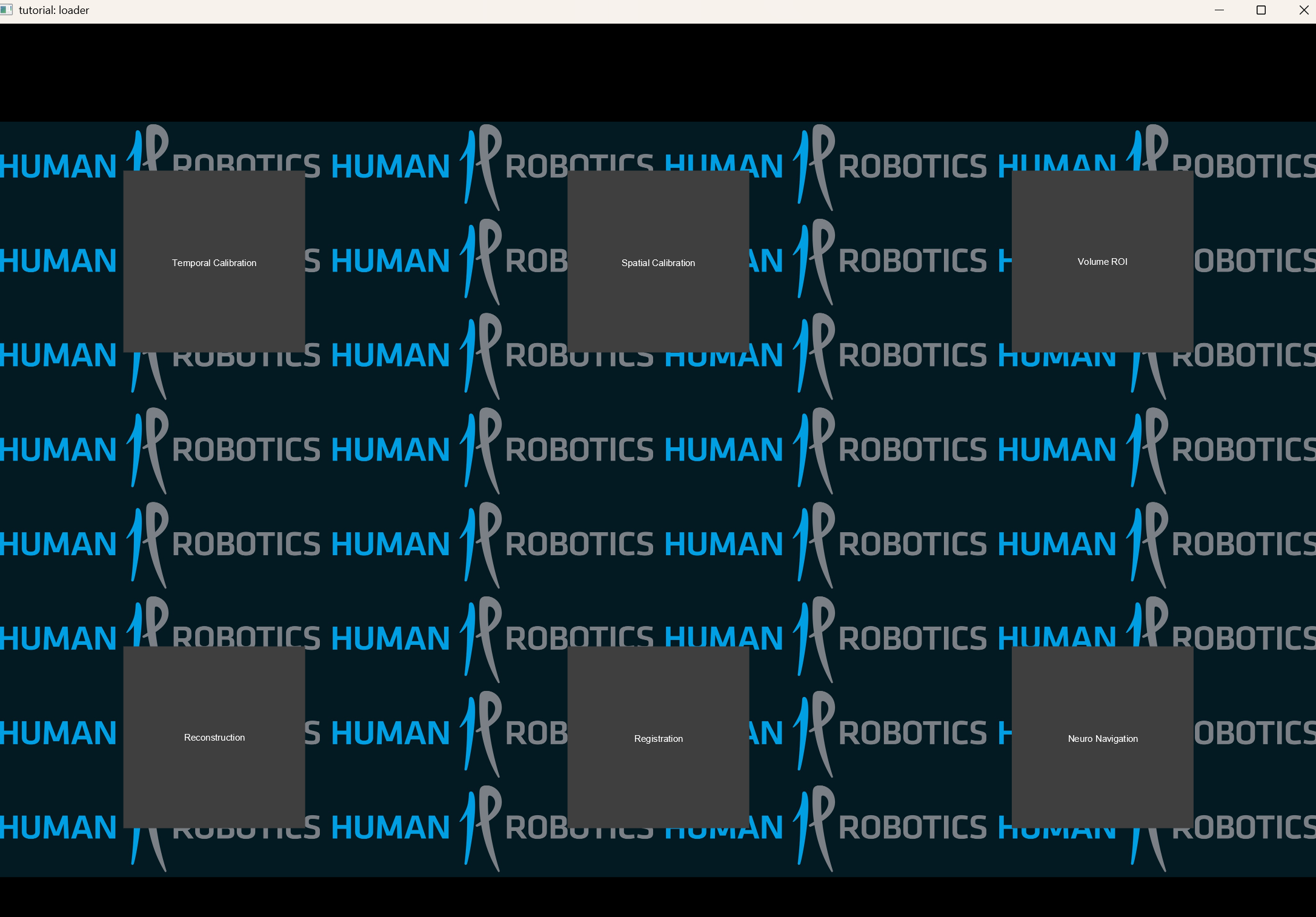
Before being scared, note that most of the tutorial is simple. firstly we include the necessary headers
#define STB_IMAGE_IMPLEMENTATION
#include "userinterface/Window.h"
#include "userinterface/widgets/Button.h"
#include "userinterface/widgets/ConfigDraw.h"
#include "userinterface/widgets/Container.h"
#include "userinterface/widgets/IconResources.h"
#include "userinterface/widgets/Loader.h"
#include "userinterface/widgets/Overlay.h"
#include "userinterface/widgets/Page.h"
#include "utils/Logger.h"

#include <iostream>
std::unique_ptr<curan::ui::Overlay> warning_overlay(const std::string &warning,curan::ui::IconResources &resources)
MiniPage
The full source code of the following tutorial is shown next. We will explain line by line what each abstraction does.
#define STB_IMAGE_IMPLEMENTATION
#include "userinterface/Window.h"
#include "userinterface/widgets/Button.h"
#include "userinterface/widgets/ConfigDraw.h"
#include "userinterface/widgets/Container.h"
#include "userinterface/widgets/IconResources.h"
#include "userinterface/widgets/Loader.h"
#include "userinterface/widgets/Minipage.h"
#include "userinterface/widgets/Overlay.h"
#include "userinterface/widgets/Page.h"
#include "utils/Logger.h"

#include <iostream>

auto container1(curan::ui::IconResources &resources) {
  using namespace curan::ui;
  std::unique_ptr<Button> button = Button::make("Touch!", resources);
  button->set_click_color(SK_ColorRED)
      .set_hover_color(SK_ColorCYAN)
      .set_waiting_color(SK_ColorGRAY)
      .set_size(SkRect::MakeWH(100, 200));

  std::unique_ptr<Button> button1 = Button::make("Leave!", resources);
  button->set_click_color(SK_ColorRED)
      .set_hover_color(SK_ColorCYAN)
      .set_waiting_color(SK_ColorGRAY)
      .set_size(SkRect::MakeWH(100, 200));

  auto container = Container::make(Container::ContainerType::LINEAR_CONTAINER,
                                   Container::Arrangement::HORIZONTAL);
  *container << std::move(button) << std::move(button1);
  return container;
}

auto container2(curan::ui::IconResources &resources) {
  using namespace curan::ui;
  std::unique_ptr<Button> button = Button::make("Do not Touch!", resources);
  button->set_click_color(SK_ColorRED)
      .set_hover_color(SK_ColorCYAN)
      .set_waiting_color(SK_ColorGRAY)
      .set_size(SkRect::MakeWH(100, 200));

  std::unique_ptr<Button> button1 = Button::make("Do not leave!", resources);
  button1->set_click_color(SK_ColorRED)
      .set_hover_color(SK_ColorCYAN)
      .set_waiting_color(SK_ColorGRAY)
      .set_size(SkRect::MakeWH(100, 200));
  auto container = Container::make(Container::ContainerType::LINEAR_CONTAINER,
                                   Container::Arrangement::HORIZONTAL);
  *container << std::move(button) << std::move(button1);
  return container;
}

void minipage_tutorial() {
  using namespace curan::ui;
  IconResources resources{CURAN_COPIED_RESOURCE_PATH "/images"};
  std::unique_ptr<Context> context = std::make_unique<Context>();

  DisplayParams param{std::move(context), 1200, 800};
  std::unique_ptr<Window> viewer = std::make_unique<Window>(std::move(param));

  auto minipage = MiniPage::make(container1(resources), SK_ColorBLACK);
  auto ptr_minipage = minipage.get();
  auto container_with_minipage =
      Container::make(Container::ContainerType::LINEAR_CONTAINER,
                      Container::Arrangement::VERTICAL);
  *container_with_minipage << std::move(minipage);

  curan::ui::Page page{std::move(container_with_minipage), SK_ColorBLACK};
  auto pool = curan::utilities::ThreadPool::create(1);
  std::atomic<bool> keep_running = true;
  pool->submit("update minipage", [&]() {
    size_t i = 0;
    while (keep_running) {
      ++i;
      ptr_minipage->construct(
          (i % 2 == 0 ? container1(resources) : container2(resources)),
          SK_ColorBLACK);
      std::this_thread::sleep_for(std::chrono::milliseconds(1000));
    }
  });
  ConfigDraw config{&page};

  while (!glfwWindowShouldClose(viewer->window)) {
    auto start = std::chrono::high_resolution_clock::now();
    SkSurface *pointer_to_surface = viewer->getBackbufferSurface();
    SkCanvas *canvas = pointer_to_surface->getCanvas();
    if (viewer->was_updated()) {
      page.update_page(viewer.get());
      viewer->update_processed();
    }
    page.draw(canvas);
    auto signals = viewer->process_pending_signals();
    if (!signals.empty())
      page.propagate_signal(signals.back(), &config);
    glfwPollEvents();

    bool val = viewer->swapBuffers();
    if (!val)
      std::cout << "failed to swap buffers\n";
    auto end = std::chrono::high_resolution_clock::now();
    std::this_thread::sleep_for(
        std::chrono::milliseconds(16) -
        std::chrono::duration_cast<std::chrono::milliseconds>(end - start));
  }
  keep_running = false;
}
firstly we include the necessary headers
MutatingTextPanel
The full source code of the following tutorial is shown next. We will explain line by line what each abstraction does.
#define STB_IMAGE_IMPLEMENTATION
#include "userinterface/Window.h"
#include "userinterface/widgets/ConfigDraw.h"
#include "userinterface/widgets/Container.h"
#include "userinterface/widgets/IconResources.h"
#include "userinterface/widgets/MutatingTextPanel.h"
#include "userinterface/widgets/Page.h"

void mutating_text_panel_tutorial() {
  using namespace curan::ui;
  IconResources resources{CURAN_COPIED_RESOURCE_PATH "/images"};
  std::unique_ptr<Context> context = std::make_unique<Context>();

  DisplayParams param{std::move(context), 1200, 800};
  std::unique_ptr<Window> viewer = std::make_unique<Window>(std::move(param));

  std::unique_ptr<MutatingTextPanel> layer =
      MutatingTextPanel::make(false, "write for life");
  layer->set_background_color({.0f, .0f, .0f, 1.0f})
      .set_text_color({1.f, 1.f, 1.f, 1.f})
      .set_highlighted_color({.2f, .2f, .2f, 1.0f})
      .set_cursor_color({1.0, 0.0, 0.0, 1.0});
  auto container = Container::make(Container::ContainerType::VARIABLE_CONTAINER,
                                   Container::Arrangement::UNDEFINED);
  container->set_variable_layout({SkRect::MakeLTRB(0.1, 0.1, 0.9, 0.9)});
  container->set_color(SkColorSetARGB(255, 255, 255, 255));

  *container << std::move(layer);

  curan::ui::Page page{std::move(container), SK_ColorBLACK};

  ConfigDraw config{&page};

  while (!glfwWindowShouldClose(viewer->window)) {
    auto start = std::chrono::high_resolution_clock::now();
    SkSurface *pointer_to_surface = viewer->getBackbufferSurface();
    SkCanvas *canvas = pointer_to_surface->getCanvas();

    if (viewer->was_updated()) {
      page.update_page(viewer.get());
      viewer->update_processed();
    }
    page.draw(canvas);
    auto signals = viewer->process_pending_signals();
    if (!signals.empty())
      page.propagate_signal(signals.back(), &config);
    glfwPollEvents();

    bool val = viewer->swapBuffers();
    if (!val)
      std::cout << "failed to swap buffers\n";
    auto end = std::chrono::high_resolution_clock::now();
    std::this_thread::sleep_for(
        std::chrono::milliseconds(16) -
        std::chrono::duration_cast<std::chrono::milliseconds>(end - start));
  }
}
firstly we include the necessary headers
OpenIGTLinkViewer
The full source code of the following tutorial is shown next. We will explain line by line what each abstraction does.
#include "userinterface/Window.h"
#include "userinterface/widgets/ConfigDraw.h"
#include "userinterface/widgets/OpenIGTLinkViewer.h"
#include "utils/Logger.h"
#include <csignal>
#include <thread>

void GetRandomTestMatrix(igtl::Matrix4x4 &matrix) {
  float position[3];
  float orientation[4];
  static float phi = 0.0;
  position[0] = 50.0 * cos(phi);
  position[1] = 50.0 * sin(phi);
  position[2] = 50.0 * cos(phi);
  phi = phi + 0.2;
  static float theta = 0.0;
  orientation[0] = 0.0;
  orientation[1] = 0.6666666666 * cos(theta);
  orientation[2] = 0.577350269189626;
  orientation[3] = 0.6666666666 * sin(theta);
  theta = theta + 0.1;
  igtl::QuaternionToMatrix(orientation, matrix);
  matrix[0][3] = position[0];
  matrix[1][3] = position[1];
  matrix[2][3] = position[2];
}

void generate_image_message(curan::ui::OpenIGTLinkViewer *button) {
  static auto raw_data = std::vector<uint8_t>(100 * 100, 0);
  for (auto &dat : raw_data)
    dat = rand();

  igtl::TimeStamp::Pointer ts;
  ts = igtl::TimeStamp::New();

  int size[] = {100, 100, 1};
  float spacing[] = {1.0, 1.0, 5.0};
  int svsize[] = {100, 100, 1};
  int svoffset[] = {0, 0, 0};
  int scalarType = igtl::ImageMessage::TYPE_UINT8;

  ts->GetTime();

  igtl::ImageMessage::Pointer imgMsg = igtl::ImageMessage::New();
  imgMsg->SetDimensions(size);
  imgMsg->SetSpacing(spacing);
  imgMsg->SetScalarType(scalarType);
  imgMsg->SetDeviceName("ImagerClient");
  imgMsg->SetSubVolume(svsize, svoffset);
  imgMsg->AllocateScalars();

  std::memcpy(imgMsg->GetScalarPointer(), raw_data.data(), raw_data.size());

  igtl::Matrix4x4 matrix;
  GetRandomTestMatrix(matrix);
  imgMsg->SetMatrix(matrix);
  imgMsg->Pack();

  igtl::MessageHeader::Pointer header_to_receive = igtl::MessageHeader::New();
  header_to_receive->InitPack();
  std::memcpy(header_to_receive->GetPackPointer(), imgMsg->GetPackPointer(),
              header_to_receive->GetPackSize());

  header_to_receive->Unpack();
  igtl::MessageBase::Pointer message_to_receive = igtl::MessageBase::New();
  message_to_receive->SetMessageHeader(header_to_receive);
  message_to_receive->AllocatePack();
  std::memcpy(message_to_receive->GetPackBodyPointer(),
              imgMsg->GetPackBodyPointer(), imgMsg->GetPackBodySize());

  button->process_message(message_to_receive);
}

void generate_transform_message(curan::ui::OpenIGTLinkViewer *button) {
  igtl::TimeStamp::Pointer ts;
  ts = igtl::TimeStamp::New();

  auto start = std::chrono::high_resolution_clock::now();
  igtl::Matrix4x4 matrix;
  GetRandomTestMatrix(matrix);
  ts->GetTime();

  igtl::TransformMessage::Pointer transMsg;
  transMsg = igtl::TransformMessage::New();
  transMsg->SetDeviceName("Tracker");

  transMsg->SetMatrix(matrix);
  transMsg->SetTimeStamp(ts);
  transMsg->Pack();

  igtl::MessageHeader::Pointer header_to_receive = igtl::MessageHeader::New();
  header_to_receive->InitPack();
  transMsg->GetBufferPointer();
  std::memcpy(header_to_receive->GetPackPointer(), transMsg->GetPackPointer(),
              header_to_receive->GetPackSize());

  header_to_receive->Unpack();
  igtl::MessageBase::Pointer message_to_receive = igtl::MessageBase::New();
  message_to_receive->SetMessageHeader(header_to_receive);
  message_to_receive->AllocatePack();
  std::memcpy(message_to_receive->GetPackBodyPointer(),
              transMsg->GetPackBodyPointer(), transMsg->GetPackBodySize());

  button->process_message(message_to_receive);
}

void open_igtlink_viewer_tutorial() {
  using namespace curan::ui;
  std::unique_ptr<Context> context = std::make_unique<Context>();
  ;
  DisplayParams param{std::move(context), 1200, 800};
  std::unique_ptr<Window> viewer = std::make_unique<Window>(std::move(param));

  auto igtlink_viewer = OpenIGTLinkViewer::make();
  auto ptr_igtlink_viewer = igtlink_viewer.get();
  auto container = Container::make(Container::ContainerType::VARIABLE_CONTAINER,
                                   Container::Arrangement::UNDEFINED);
  container->set_variable_layout({SkRect::MakeLTRB(0.1, 0.1, 0.9, 0.9)});
  container->set_color(SkColorSetARGB(255, 255, 255, 255));
  auto pool = curan::utilities::ThreadPool::create(1);
  *container << std::move(igtlink_viewer);

  std::atomic<bool> running = true;

  pool->submit("image generator and transform", [&]() {
    while (running) {
      auto start = std::chrono::high_resolution_clock::now();
      generate_image_message(ptr_igtlink_viewer);
      generate_transform_message(ptr_igtlink_viewer);
      auto end = std::chrono::high_resolution_clock::now();
      std::this_thread::sleep_for(
          std::chrono::milliseconds(16) -
          std::chrono::duration_cast<std::chrono::milliseconds>(end - start));
    }
  });

  curan::ui::Page page{std::move(container), SK_ColorBLACK};

  ConfigDraw config{&page};

  while (!glfwWindowShouldClose(viewer->window)) {
    auto start = std::chrono::high_resolution_clock::now();
    SkSurface *pointer_to_surface = viewer->getBackbufferSurface();
    SkCanvas *canvas = pointer_to_surface->getCanvas();

    if (viewer->was_updated()) {
      page.update_page(viewer.get());
      viewer->update_processed();
    }
    page.draw(canvas);
    auto signals = viewer->process_pending_signals();
    if (!signals.empty())
      page.propagate_signal(signals.back(), &config);
    glfwPollEvents();

    bool val = viewer->swapBuffers();
    if (!val)
      std::cout << "failed to swap buffers\n";
    auto end = std::chrono::high_resolution_clock::now();
    std::this_thread::sleep_for(
        std::chrono::milliseconds(16) -
        std::chrono::duration_cast<std::chrono::milliseconds>(end - start));
  }
  running = false;
}
firstly we include the necessary headers
Plotter
The full source code of the following tutorial is shown next. We will explain line by line what each abstraction does.
#define STB_IMAGE_IMPLEMENTATION
#include "userinterface/Window.h"
#include "userinterface/widgets/ConfigDraw.h"
#include "userinterface/widgets/Container.h"
#include "userinterface/widgets/IconResources.h"
#include "userinterface/widgets/Page.h"
#include "userinterface/widgets/Plotter.h"

void plotter_tutorial() {
  using namespace curan::ui;
  IconResources resources{CURAN_COPIED_RESOURCE_PATH "/images"};
  std::unique_ptr<Context> context = std::make_unique<Context>();
  DisplayParams param{std::move(context), 1200, 800};
  std::unique_ptr<Window> viewer = std::make_unique<Window>(std::move(param));

  auto plotter = Plotter::make(500, 2);
  auto ptr_plotter = plotter.get();
  auto container = Container::make(Container::ContainerType::VARIABLE_CONTAINER,
                                   Container::Arrangement::UNDEFINED);
  container->set_variable_layout({SkRect::MakeLTRB(0.1, 0.1, 0.9, 0.9)});
  container->set_color(SkColorSetARGB(255, 255, 255, 255));
  auto pool = curan::utilities::ThreadPool::create(1);

  std::atomic<bool> running = true;

  pool->submit("plotter update", [&]() {
    double timing = 0.0;
    while (running) {
      auto start = std::chrono::high_resolution_clock::now();
      ptr_plotter->append(SkPoint::Make(timing, std::sin(timing)), 0);
      ptr_plotter->append(SkPoint::Make(timing, std::cos(timing) + 1), 1);
      auto end = std::chrono::high_resolution_clock::now();
      std::this_thread::sleep_for(
          std::chrono::milliseconds(16) -
          std::chrono::duration_cast<std::chrono::milliseconds>(end - start));
      timing += 16 * 1e-3;
    }
  });

  *container << std::move(plotter);

  curan::ui::Page page{std::move(container), SK_ColorBLACK};

  ConfigDraw config{&page};

  while (!glfwWindowShouldClose(viewer->window)) {
    auto start = std::chrono::high_resolution_clock::now();
    SkSurface *pointer_to_surface = viewer->getBackbufferSurface();
    SkCanvas *canvas = pointer_to_surface->getCanvas();
    if (viewer->was_updated()) {
      page.update_page(viewer.get());
      viewer->update_processed();
    }
    page.draw(canvas);
    auto signals = viewer->process_pending_signals();
    if (!signals.empty())
      for (auto &&sig : signals)
        page.propagate_signal(sig, &config);
    glfwPollEvents();

    bool val = viewer->swapBuffers();
    if (!val)
      std::cout << "failed to swap buffers\n";
    auto end = std::chrono::high_resolution_clock::now();
    std::this_thread::sleep_for(
        std::chrono::milliseconds(16) -
        std::chrono::duration_cast<std::chrono::milliseconds>(end - start));
  }
  running = false;
  return;
}
firstly we include the necessary headers
Slider
The full source code of the following tutorial is shown next. We will explain line by line what each abstraction does.
#define STB_IMAGE_IMPLEMENTATION
#include "userinterface/Window.h"
#include "userinterface/widgets/ConfigDraw.h"
#include "userinterface/widgets/Container.h"
#include "userinterface/widgets/IconResources.h"
#include "userinterface/widgets/Page.h"
#include "userinterface/widgets/Slider.h"


void slider_tutorial() {
  using namespace curan::ui;
  IconResources resources{CURAN_COPIED_RESOURCE_PATH "/images"};
  std::unique_ptr<Context> context = std::make_unique<Context>();

  DisplayParams param{std::move(context), 2200, 1200};
  std::unique_ptr<Window> viewer = std::make_unique<Window>(std::move(param));

  auto slider = Slider::make({ 0.0f, 300.0f });
		slider->set_click_color(SK_ColorDKGRAY).set_hover_color(SK_ColorCYAN).set_waiting_color(SK_ColorGRAY)
				.set_slider_color(SK_ColorLTGRAY).set_callback([](Slider* slider, ConfigDraw* config) {
			std::cout << "received signal!\n";
		}).set_size(SkRect::MakeWH(300,40));

  auto container = Container::make(Container::ContainerType::LINEAR_CONTAINER,
                                   Container::Arrangement::VERTICAL);
  *container << std::move(slider);

  curan::ui::Page page{std::move(container), SK_ColorBLACK};

  ConfigDraw config{&page};

  while (!glfwWindowShouldClose(viewer->window)) {
    auto start = std::chrono::high_resolution_clock::now();
    SkSurface *pointer_to_surface = viewer->getBackbufferSurface();
    SkCanvas *canvas = pointer_to_surface->getCanvas();
    if (viewer->was_updated()) {
      page.update_page(viewer.get());
      viewer->update_processed();
    }
    page.draw(canvas);
    auto signals = viewer->process_pending_signals();
    if (!signals.empty())
      page.propagate_signal(signals.back(), &config);
    glfwPollEvents();

    bool val = viewer->swapBuffers();
    if (!val)
      std::cout << "failed to swap buffers\n";
    auto end = std::chrono::high_resolution_clock::now();
    std::this_thread::sleep_for(
        std::chrono::milliseconds(16) -
        std::chrono::duration_cast<std::chrono::milliseconds>(end - start));
  }
  return;
}
firstly we include the necessary headers
SliderPanel
The full source code of the following tutorial is shown next. We will explain line by line what each abstraction does.
#define STB_IMAGE_IMPLEMENTATION
#include "itkImage.h"
#include "userinterface/Window.h"
#include "userinterface/widgets/Button.h"
#include "userinterface/widgets/ConfigDraw.h"
#include "userinterface/widgets/Container.h"
#include "userinterface/widgets/IconResources.h"
#include "userinterface/widgets/Page.h"
#include "userinterface/widgets/SliderPanel.h"
#include "userinterface/widgets/definitions/Interactive.h"

using PixelType = unsigned char;
constexpr unsigned int Dimension = 3;
using ImageType = itk::Image<PixelType, Dimension>;

ImageType::Pointer get_volume(size_t dimensions) {
  ImageType::Pointer memo = ImageType::New();

  ImageType::SizeType size;
  size[0] = dimensions;
  size[1] = dimensions;
  size[2] = dimensions;

  ImageType::IndexType start;
  start.Fill(0);

  ImageType::RegionType region;
  region.SetIndex(start);
  region.SetSize(size);

  const itk::SpacePrecisionType origin[Dimension] = {0.0, 0.0, 0.0};
  memo->SetOrigin(origin);
  const itk::SpacePrecisionType spacing[Dimension] = {1.0, 1.0, 1.0};
  memo->SetSpacing(spacing);
  memo->SetRegions(region);

  memo->Allocate();

  auto raw_buffer = memo->GetBufferPointer();
  for (size_t i = 0; i < dimensions * dimensions * dimensions; ++i)
    raw_buffer[i] = rand();

  return memo;
}

void slider_panel_tutorial() {
  using namespace curan::ui;
  IconResources resources{CURAN_COPIED_RESOURCE_PATH "/images"};
  std::unique_ptr<Context> context = std::make_unique<Context>();

  DisplayParams param{std::move(context), 2200, 1200};
  std::unique_ptr<Window> viewer = std::make_unique<Window>(std::move(param));

  VolumetricMask mask{get_volume(100)};
  std::unique_ptr<curan::ui::SlidingPanel> image_display =
      curan::ui::SlidingPanel::make(resources, &mask, curan::ui::Direction::Z);

  auto container = Container::make(Container::ContainerType::LINEAR_CONTAINER,
                                   Container::Arrangement::VERTICAL);
  *container << std::move(image_display);

  curan::ui::Page page{std::move(container), SK_ColorBLACK};

  ConfigDraw config{&page};

  while (!glfwWindowShouldClose(viewer->window)) {
    auto start = std::chrono::high_resolution_clock::now();
    SkSurface *pointer_to_surface = viewer->getBackbufferSurface();
    SkCanvas *canvas = pointer_to_surface->getCanvas();
    if (viewer->was_updated()) {
      page.update_page(viewer.get());
      viewer->update_processed();
    }
    page.draw(canvas);
    auto signals = viewer->process_pending_signals();
    if (!signals.empty())
      for (auto &&sig : signals)
        page.propagate_signal(sig, &config);
    glfwPollEvents();

    bool val = viewer->swapBuffers();
    if (!val)
      std::cout << "failed to swap buffers\n";
    auto end = std::chrono::high_resolution_clock::now();
    std::this_thread::sleep_for(
        std::chrono::milliseconds(16) -
        std::chrono::duration_cast<std::chrono::milliseconds>(end - start));
  }
  return;
}
firstly we include the necessary headers
TextBlob
The full source code of the following tutorial is shown next. We will explain line by line what each abstraction does.
#define STB_IMAGE_IMPLEMENTATION
#include "userinterface/Window.h"
#include "userinterface/widgets/ConfigDraw.h"
#include "userinterface/widgets/TextBlob.h"
#include <iostream>
#include <thread>

void textblob_tutorial() {
  using namespace curan::ui;
  IconResources resources{CURAN_COPIED_RESOURCE_PATH "/images"};
  std::unique_ptr<Context> context = std::make_unique<Context>();
  DisplayParams param{std::move(context), 1200, 800};
  std::unique_ptr<Window> viewer = std::make_unique<Window>(std::move(param));

  auto textblob = TextBlob::make("example text");
  textblob->set_text_color(SK_ColorWHITE)
      .set_background_color(SK_ColorBLACK)
      .set_size(SkRect::MakeWH(200, 90));
  auto container = Container::make(Container::ContainerType::VARIABLE_CONTAINER,
                                   Container::Arrangement::UNDEFINED);
  container->set_variable_layout({SkRect::MakeLTRB(0.1, 0.1, 0.9, 0.9)});
  container->set_color(SkColorSetARGB(255, 255, 255, 255));
  *container << std::move(textblob);

  curan::ui::Page page{std::move(container), SK_ColorBLACK};

  ConfigDraw config{&page};

  while (!glfwWindowShouldClose(viewer->window)) {
    auto start = std::chrono::high_resolution_clock::now();
    SkSurface *pointer_to_surface = viewer->getBackbufferSurface();
    SkCanvas *canvas = pointer_to_surface->getCanvas();
    if (viewer->was_updated()) {
      page.update_page(viewer.get());
      viewer->update_processed();
    }
    page.draw(canvas);
    auto signals = viewer->process_pending_signals();
    if (!signals.empty())
      for (auto &&sig : signals)
        page.propagate_signal(sig, &config);
    glfwPollEvents();

    bool val = viewer->swapBuffers();
    if (!val)
      std::cout << "failed to swap buffers\n";
    auto end = std::chrono::high_resolution_clock::now();
    std::this_thread::sleep_for(
        std::chrono::milliseconds(16) -
        std::chrono::duration_cast<std::chrono::milliseconds>(end - start));
  }
  return;
}
firstly we include the necessary headers